Three people, the same messages all day, and the tool that typed them was gone
Our property management company changed, and the software licences went with it. TextExpander was one of them. I rebuilt the part of it our support desk actually used, a system-wide text expander for Mac and Windows, and shipped it to the two people beside me in eleven days.
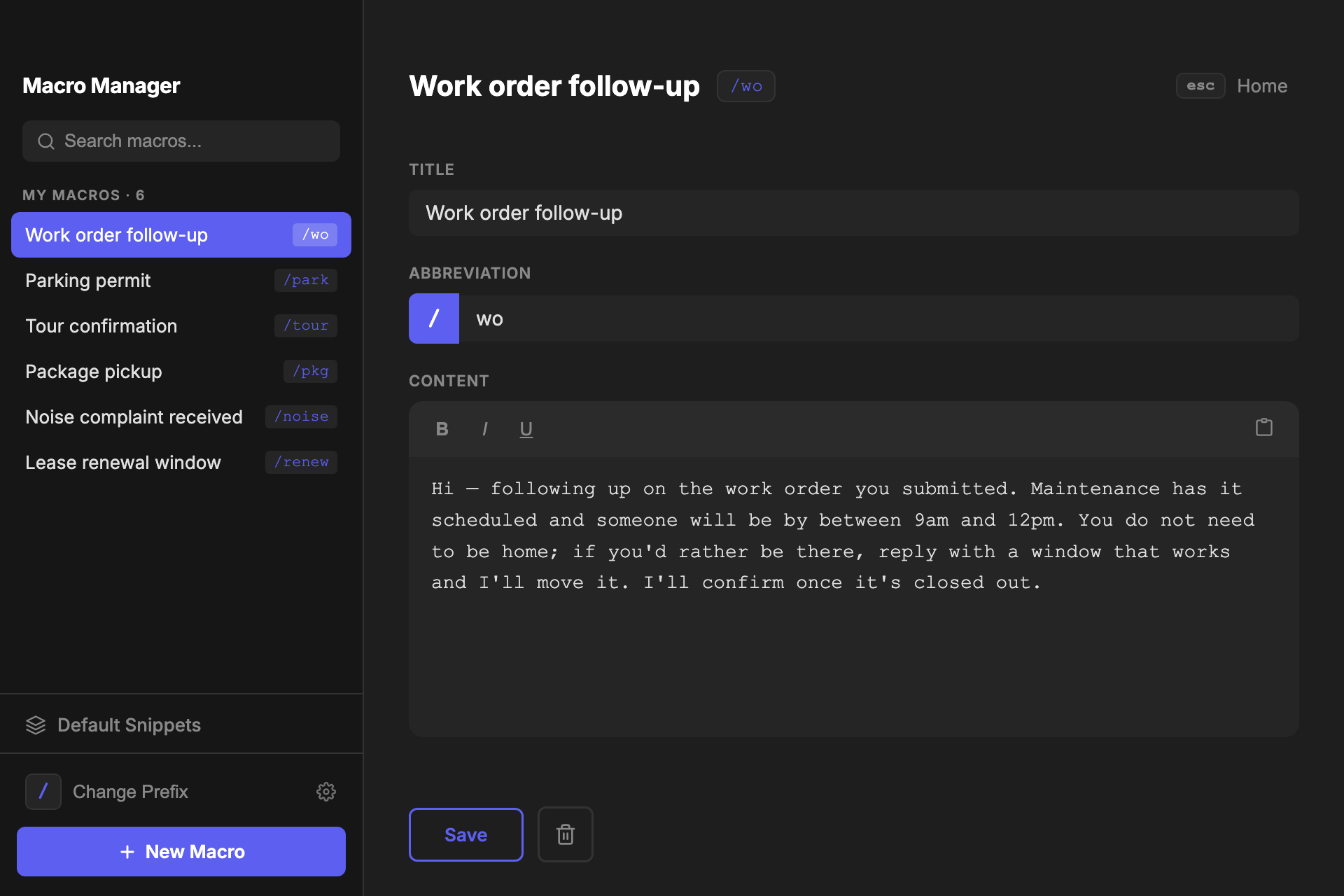
Hi — following up on the work order you submitted. Maintenance has it scheduled and someone will be by between 9am and 12pm. You do not need to be h…
- Role
- Everything, down to the support afterwards
- Built with
- Electron, JavaScript, Claude Code
- Timeline
- Eleven days, April 2026
- Shipped
- Five releases, still in use
The tool went away. The typing did not.
I worked a support desk at a residential community. Three of us, and most of the day was outreach: work order follow-ups, parking permits, tour confirmations, the same six or seven answers with a name and a date changed. TextExpander typed them. Four characters and the paragraph appeared.
When the company managing the property changed, the software contracts changed with it, and TextExpander was not renewed. Nobody announced it as a loss. I already had my own version, a Python script in a Tkinter window that started with sudo /usr/local/bin/python3.11 snippet_manager.py in a terminal. Nobody else on that desk was ever going to type that.
So we went back to answering by hand. Ask three people on a desk what a parking permit needs and you get three replies. One asks for the plate. One asks for the plate and the make. One tells the resident to come by the office. All three are correct, none of them match, and a resident who asks twice gets told two different things. A saved macro is one answer that everybody sends.
What we lost was not typing time. It was the same answer twice.
The bet was that almost none of TextExpander is the part you use.
I had a week of evenings and two people waiting, so I picked the four things it could not skip.
Two JSON files on your disk.
No account, no server, no sync. The macros are a file in Application Support and the usage counts are the file beside it. The README says it in one line: never sent anywhere.
The cost. There is no team library. If I change a macro, nothing reaches anybody. I export a file and hand it over.
One flat list. No folders, no tags.
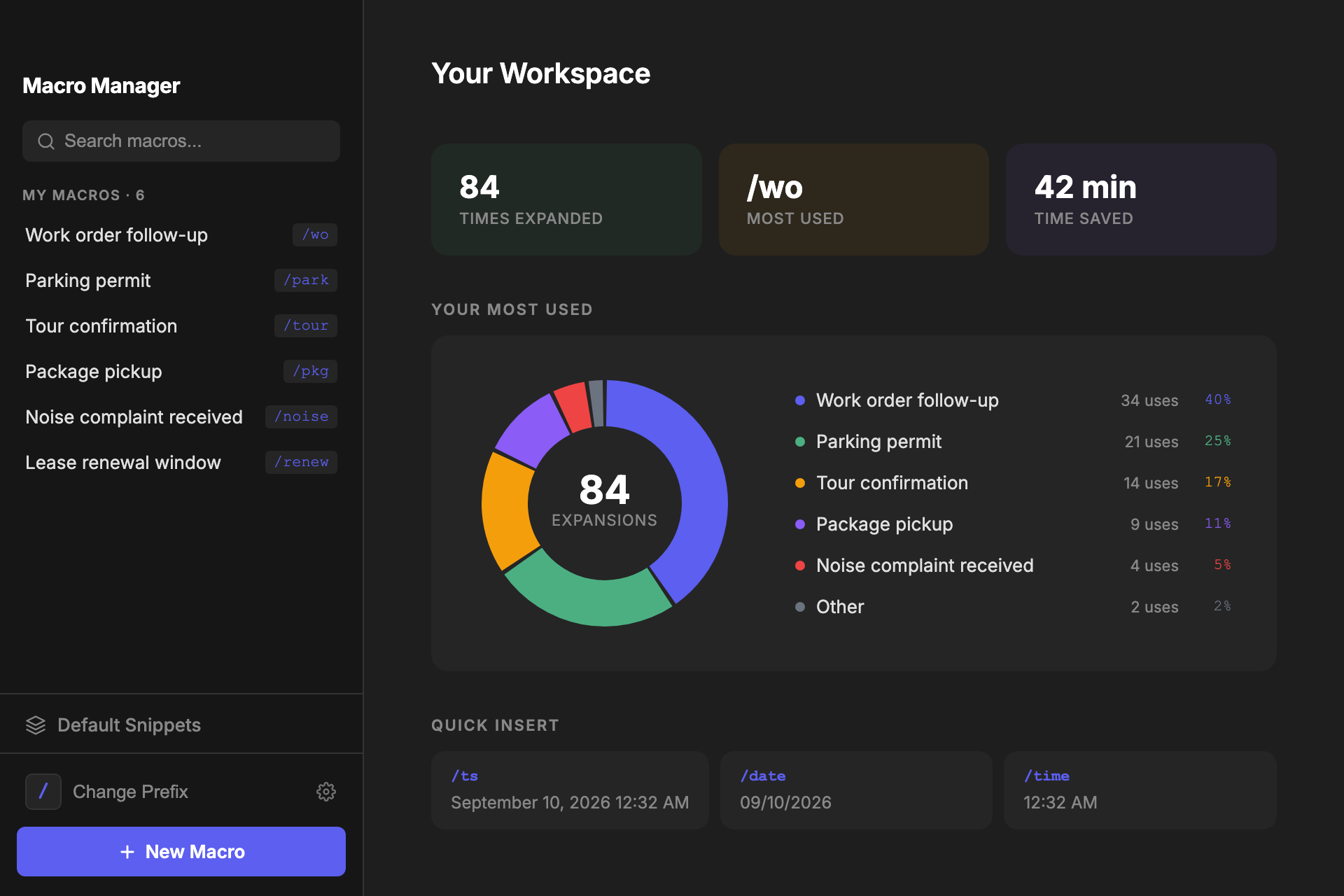
Search matches the title, the abbreviation and the body, and the section header doubles as the count. At the number of macros a support desk actually keeps, search finds one faster than a folder tree would.
The cost. It will not hold four hundred macros, and I did not build for a person who has four hundred.
Static text. No variables, no fill-ins.
TextExpander lets a snippet stop and ask you for a name. I left that out and shipped seven date and time resolvers instead, because a date was the only value anybody was actually filling in.
The cost. You still type the resident's name yourself. That is the single feature I would add first, and leaving it out is what let the rest ship in a week.
It lives in the menu bar and starts itself.
Closing the window hides it. Launch at login is a checkbox in the tray menu. An expander you have to remember to run is an expander that is off on the morning you need it.
The cost. It is always running, which means it is always holding a global keyboard hook. That is a real thing to ask of somebody's machine, and it is why the listener disables itself the moment it has work to do.
The seven date and time resolvers are the only content the app ships, and a macro you save with the same abbreviation always wins.
- Full Timestamp/ts
- Short Date/date
- ISO Date/isodate
- Time/time
- 24hr Time/time24
- Day + Date/day
- Unix Timestamp/unix
Every expansion borrows your clipboard and puts it back.
Nothing is typed out. The app snapshots your clipboard, writes the macro onto it, sends one backspace for every character you typed plus the space that fired it, sends a paste, waits four hundred milliseconds, and puts your clipboard back the way it was.
My macros · 3
Any app, anywhere. This one is a stand-in
Type it yourself, or let it type.
Buffer
- Backspaces to send
- 0
- Listener
- active
- Your clipboard
- untouched
The buffer, the listener and the clipboard are real variables in the app, and the two waits are its real timings. Break the buffer with an arrow key or a click to see the rule that took the longest to get right.
The rule that took longest is the one about when to throw the buffer away. Holding shift for a capital must not clear it, because the hook reports physical keys. An arrow key must clear it, and so must a mouse click, because the cursor has moved and the characters I am holding are no longer in front of it. Get that wrong and it pastes a paragraph into the middle of a sentence you already sent.
Nobody will ever thank me for the four hundred milliseconds. They would have told me immediately if it were four thousand.
Two days to build it, nine to get it onto someone else’s laptop.
Twenty-two commits between April 10 and April 20. The order they came in is the honest version of how this went.
April 10, 9:20pm
The whole app, in one commit
Eleven files and 2,137 hand-written lines: the main process, the keyboard hook, the renderer, and a README. A rewrite of the Python tool arriving finished, because I already knew what it had to do.
a931458
April 11, morning
The pass that made it safe to hand over
Corrupt-file recovery, shape normalisation on load, modifier keys that do not clear the buffer, punctuation, and buffer invalidation on a mouse click. Before this it mostly worked. After it, it could be somebody else's app.
9723cf4
April 11, all day
Navigation, then a README, then export
Five commits in seven hours, and the order is the story: get around the app, write install instructions for somebody non-technical, add a way to move macros between machines, then disappear into the menu bar and start at login.
April 15
Eight commits, none of them features
Windows and CI. Three releases in one day, each fixing a different way the app looked broken the first time somebody opened it. Then an auto-updater, because I could no longer reach the machines it was running on.
- v1.0.2Wrap electron-updater in try/catch to prevent launch crash
- v1.0.3Clicking X on Windows now quits the app normally
- v1.0.4First launch: window is shown automatically so the user isn't confused
April 18 to 20
Polish, and then it stops
The home screen, the donut, the toolbar. Then nothing. v1.0.5 is still a draft release and the last commit in the repository is a CI fix.
52cdaf7
Those are my own release notes, unedited, and every line is about the first thirty seconds of owning the app. The one I would point at is the last. I wrote that sentence about somebody else, on the fourth try, and the auto-updater shipped the same afternoon, because I could no longer reach the machines this was running on.
Not sure which you have? Click the Apple menu → About This Mac. Look for “Apple M” (Silicon) or “Intel” under Chip or Processor.
Twenty-six installers have been downloaded across the five published releases. That is a small number and I am not going to dress it up. It was built for three people and it reached about that many. What it proves is that it left my machine.
I did not run sessions with the other two. I sent them the app, sat with each of them once to show them how to add their own macros, and then used it all day myself in the same job they were doing. Being my own main user got me a tool that fits one person and has soft spots exactly where that person did not look.
I gave a plain text field a bold button, and I am still paying for it.
I gave the macro editor a formatting toolbar. Bold, italic, underline, on a contenteditable field, because that is what a text editor has. Forty-three minutes after the first commit I pushed one called fix: save plain text content, because an expander pastes into Outlook, Teams, a browser and a terminal, and the only thing all four accept is plain text.
What it cost is still in the codebase. The expansion path carries a twenty-line normalisation routine that strips tags and decodes six named entities, and whose comment says it is there for markup from old saves. A cleanup step whose only job is to undo damage from a feature I removed. The three buttons are still in the toolbar, doing nothing that survives a paste.
What I do now is decide what the data is before I decide what the editor looks like.
The interface implied a data model I had not chosen. That is a cheaper mistake to find on day one than on day nine.
Next: fill-in fields, notarisation, and two dead handlers I found by reading my own code to write this page. v1.0.5 is still a draft release, which is the most accurate thing here about where the project is.
The whole of this product is a string the app keeps in memory and throws away before anybody sees it. Ask me about the string.