


01 · The Song Island
See What's Playing, As It Happens.
See what your friends are playing in real time, right from their profile on their Song Island. View active music, join a session, and share the moment with a single tap.
Music Sessions
Music brings people together, but listening is still a largely solo experience. Friends text song links, share playlists, or send screenshots - yet there's no effortless way to listen together in real time. Existing solutions require too much coordination, break immersion, or feel disconnected from how people naturally use their phones.
Sessions is a lightweight iOS feature that lets friends listen to music together in real time - designed to feel ambient, social, and non-disruptive. By integrating shared listening directly into the system UI, Sessions removes friction and keeps people connected without pulling them out of what they're already doing.
Short on time? Use the button below to jump straight to the final solution.
Final ProductBefore designing, I validated whether real-time shared listening was a meaningful problem. Through user surveys and competitive analysis, I assessed demand, surfaced existing friction, and identified opportunities where shared listening could add genuine value.
User Survey
Understand how people share music today
Competitive Analysis
Spot gaps in existing solutions
User Research
Create personas and map the shared listening journey
I conducted an initial survey using Google Forms and received responses from 39 adults (ages 19-30), recruited through word of mouth and posts on Instagram and LinkedIn.
user's behavior with music
user's painpoints in existing music-sharing features
what key features would best improve the user experience
 Take
TakeEveryone listens to music
Most users listen to music for hours every day ~ mainly on their phones, computers, and cars
Connection through Music
While not all survey participants felt a strong need for a real-time music-sharing feature, many saw its potential to improve how people connect through music.
Users can see its value in virtual settings, such as gaming sessions or long-distance relationships, as well as in group activities like workouts or study sessions. A feature like this would make shared listening more seamless and accessible for those who want to.
Current Options Fall Short
For most people I surveyed, Spotify Jam was the only real-time music feature they recognized — usually used at parties. A few had tried Discord bots or Apple SharePlay, but those came with constant complaints about lag and connection issues. Outside of that, many hadn't explored any tools for listening together at all, highlighting just how limited and clunky the current options feel.
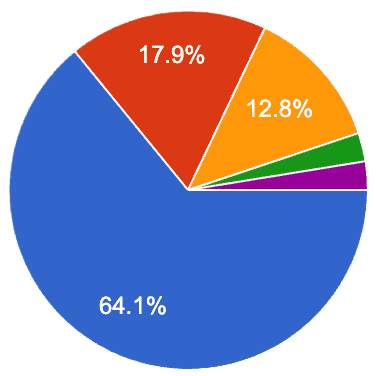

Spotify Reigns King
The survey made one thing clear: Spotify is where most people are listening. Apple Music and YouTube Music trailed behind, while the rest were scattered across niche apps and alternatives.
Privacy Matters
Most people liked the idea of sharing their listening activity as a way to connect with others, but they still want control over when and with whom. Privacy came up a lot — users want the flexibility to choose which friends can see what they're playing, and the option to go “incognito” whenever they'd rather keep their music to themselves.
Let's get to Work
TLDR; I've seen enough. I want to make this into a reality!
In short, my research showed that while people listen to music constantly — mostly on Spotify — the tools for sharing in real time still feel clunky and limited. Users saw real potential for shared listening in everyday moments like gaming, workouts, or long-distance relationships, but they also wanted control over their privacy. This gap highlights an opportunity to design a smoother, more intentional way to connect through music.
To better understand the landscape of real-time music sharing, I reviewed three existing solutions. My goal was to learn what these apps do well, where users get frustrated, and what opportunities exist to create a smoother, more engaging experience.
Looking at the SWOTs, it was clear each app had something going for it — but also big gaps. That got me thinking: what's really missing from the experience, and how could I turn those takeaways into a problem worth solving? This is where I started pulling the insights together to define the real opportunity.
After identifying the gaps in existing music-sharing experiences, I wanted to understand who these problems really affect — and how they play out in their day-to-day interactions. The research pointed to a mix of listeners: those who use music to feel connected, and those who love discovering and sharing songs in the moment.
To capture their motivations and frustrations, I created two user personas that represent these behaviors, along with a user journey map to visualize where they run into friction when sharing music on mobile.
Hello,
Jordan Kim
Age: 25 · Occupation: Marketing Associate
"I love when my friends send me songs, but I wish we could easily listen to them together."
Listening Habits: Streams music all day while working and commuting. Shares playlists with friends but wishes it felt more interactive.
Sharing music feels slow and disconnected — links just sit in chats.
Apps like Discord or SharePlay require too many steps to sync up.
Misses the spontaneous moments of listening together.
Stay connected with friends through music
Discover what others are listening to in real time
Make listening together feel as easy as sending a text.
Main Motivator is Connection. Jordan sees music as a way to keep friendships alive and feel close, especially in long-distance or digital relationships. (This Persona is based on me hehe)

Hello,
Alex Rivera
Age: 22 · Occupation: College Student
"When I find a good track, I want my friends to hear it now. Not later, not through a screenshot."
Listening Habits: Constantly exploring new artists and curating playlists. Loves showing friends what's trending before it hits big.
Sharing on mobile feels clunky — links break, apps don't sync.
Can't see what friends are listening to unless they post it somewhere.
Most features feel built for parties, not everyday use.
Share music effortlessly without interrupting their flow.
Get quick reactions or conversations started around songs.
Feel seen for their music taste and discoveries.
Main Motivator is Expression. Alex uses music as identity — to express moods, personality, and connect with like-minded friends.
This journey map explores how users discover, share, and join real-time music sessions with their contacts. The goal was to identify where excitement or friction occurs in the flow and uncover opportunities to make social listening feel more seamless, secure, and personal.
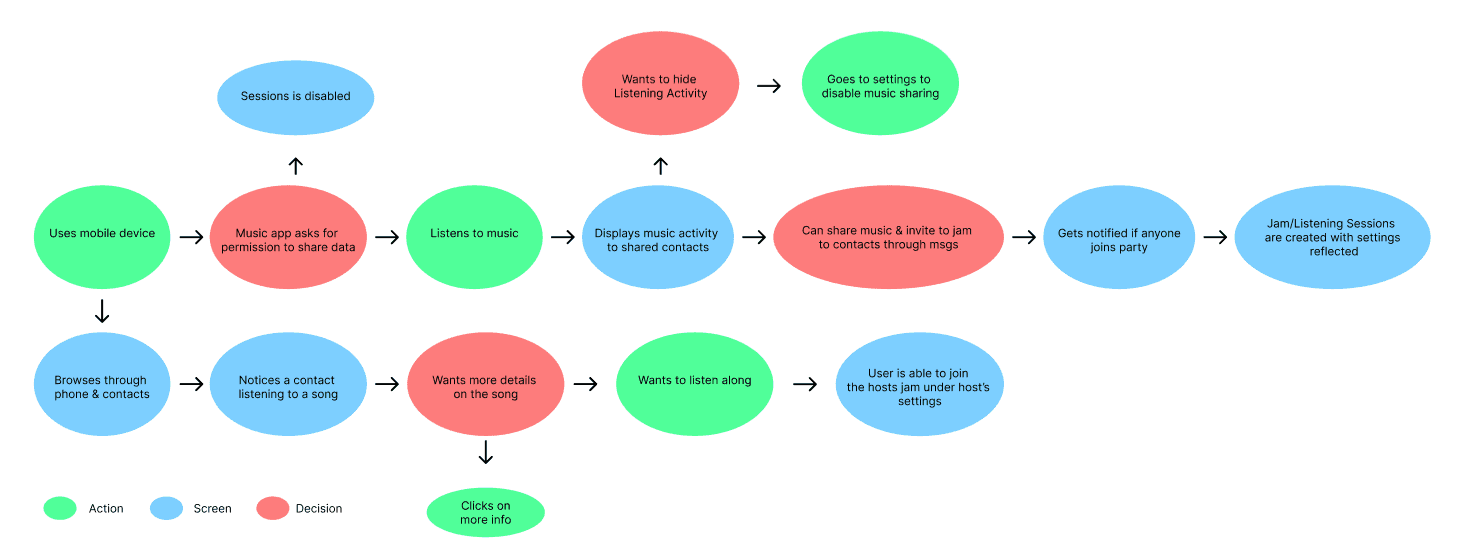
Through my personas and journey mapping, I noticed clear patterns in how people share and connect through music. While motivations differed, most users wanted sharing to feel more natural and social. These insights revealed key opportunities that shaped my design direction and informed the “How Might We” statements in the next phase.

Music is a big part of my daily routine, but I've always felt it could be more social. Seeing how Discord's Spotify feature lets friends listen together inspired me to create that same experience on our phones - turning casual listening into a shared moment that brings people closer.
— Nate
Sharing music on mobile still feels harder than it should.
Research InsightsHow Might We Statements
Sharing music today feels clunky and requires multiple steps.
HMW make sharing music seamless on iOS without extra apps?
People want music to be social but not always public
HMW design for social connection while preserving privacy?
Music often sparks conversations, but current apps don't support it.
HMW turn music into a conversation starter on mobile?
Insights only matter when they lead to thoughtful design. Using my research as a foundation, I began defining how the product should look, feel, and behave — focusing on connection, control, and simplicity.
Real-Time Music Sharing
Turning Listening into Shared Moments
The design focuses on making music sharing feel natural and spontaneous. Users can see what friends are currently listening to, jump into a live session, or send a quick “listen together” invite — all without switching apps or disrupting what they're doing.
Privacy & Preferences
Control When and How you share
Users wanted ways to share that didn't feel intrusive. In response, privacy settings give full control — from choosing who can view your activity to turning off sharing completely. These options let users decide what feels right for them at any moment.
Social Interaction
Making Music More Conversational
Instead of just sending links, users can react, reply, or comment directly on a song. These small, lightweight gestures transform passive listening into moments of connection — sparking new conversations around what people love.
iOS Integrations
Built Into the way you already listen
The experience lives within iOS — not as another app, but as an extension of what's already there. From the Contacts app to Dynamic Island, users can see who's listening and instantly tap to join. Everything feels native, familiar, and seamlessly connected to Apple Music.
Personalized Touchpoints
Designed Around Your Listening Habits
The system learns from how you share and who you connect with most. Favorite friends appear at the top of your list, shared sessions are easy to revisit, and suggestions evolve based on your listening patterns. Every detail is designed to feel personal — like the feature was made just for you.
The insights from my research shaped how visible shared listening should be and where it made the most sense within iOS. Instead of concentrating everything into one feature, I designed a set of lightweight touchpoints that fit naturally into existing behaviors and system surfaces.
Listening is already social, but invisible. Placing active listening on user profiles makes shared listening discoverable without forcing interaction, letting curiosity—not notifications—drive connection.
Shared listening needs to be fast and optional. Control Center access reduces friction by allowing users to join or manage sessions without leaving what they're doing.
When people share music, they often need context. The Song Card centralizes key details—track, artist, source, and session context—so users understand what they're hearing without asking or guessing.
Shared listening introduces privacy and social pressure. Settings give users control over visibility, participation, and notifications, ensuring the experience remains opt-in and comfortable.
Shared experiences shouldn't disappear the moment they end. Session Recaps turn real-time listening into a lightweight artifact—helping users revisit moments, discover music, and reflect on the experience.
Shared listening should feel present, not distracting. Using Dynamic Island allows sessions to stay visible at a glance, keeping users informed without pulling them out of their current task.
Early sketches turned research insights into real solutions. They helped me quickly map user pain points and experiment with ways the experience could address them before refining the design further.
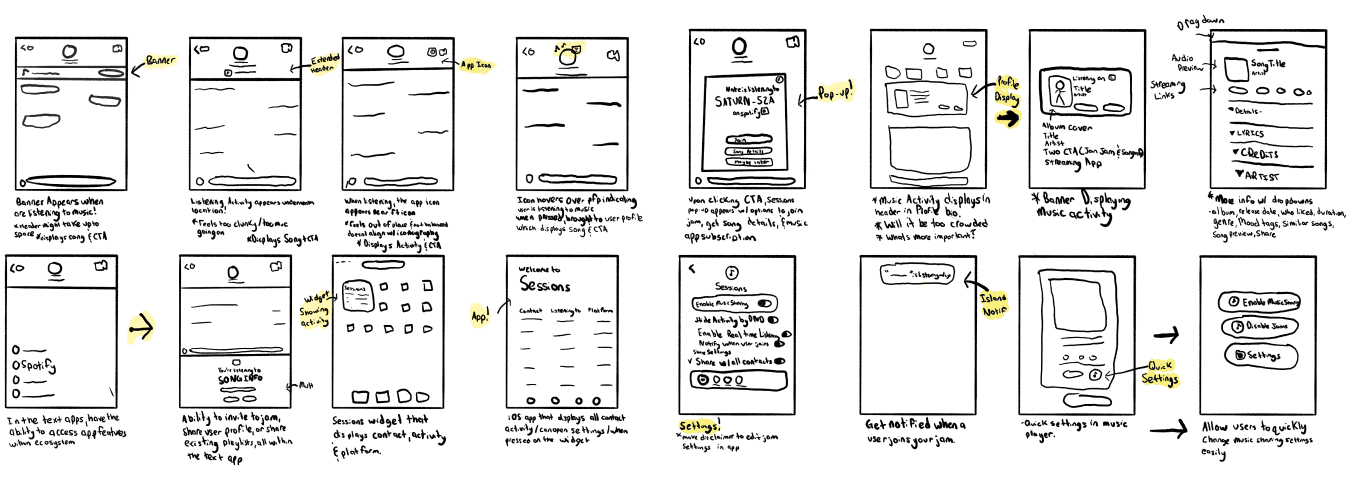
As I moved from sketches to screens, I focused on making each interaction feel simple and genuine. I played with different layouts and flows, refining what moments should feel spontaneous and what should feel more intentional.


Displaying Active Listening
One of the first challenges was figuring out how to show that someone's listening without disrupting the existing iOS layout. Early concepts took up too much space or felt out of place with native elements. I needed something subtle — something that fit naturally into Apple's ecosystem.
I landed on a simple solution: a small music-service icon placed above the user's profile photo. It signals that they're actively listening, while keeping the interface clean and familiar. Tapping the icon takes you straight to their profile, where you can see what they're playing.


The first sketch
Listening Activity Card
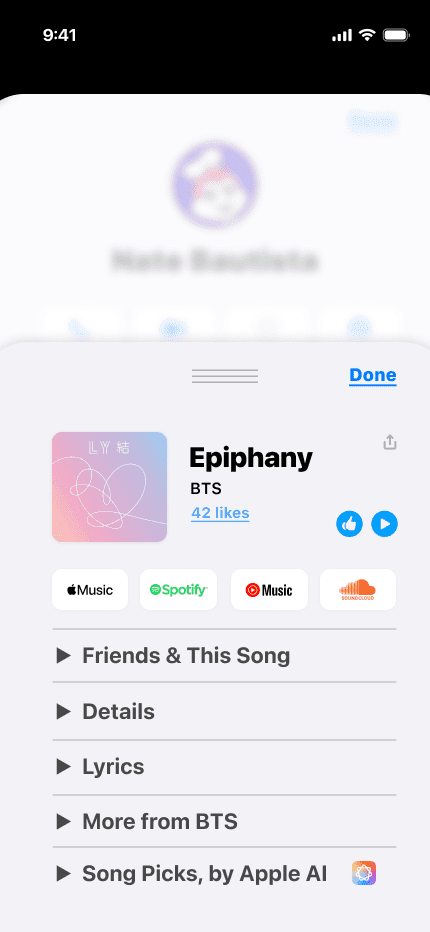
When bringing the song island to messages, the main question was how to make it feel native to iOS. I needed to decide which actions were essential without cluttering the space or breaking the existing design patterns. Through feedback and multiple iterations, I refined which buttons and CTAs actually added value — balancing usability with simplicity.
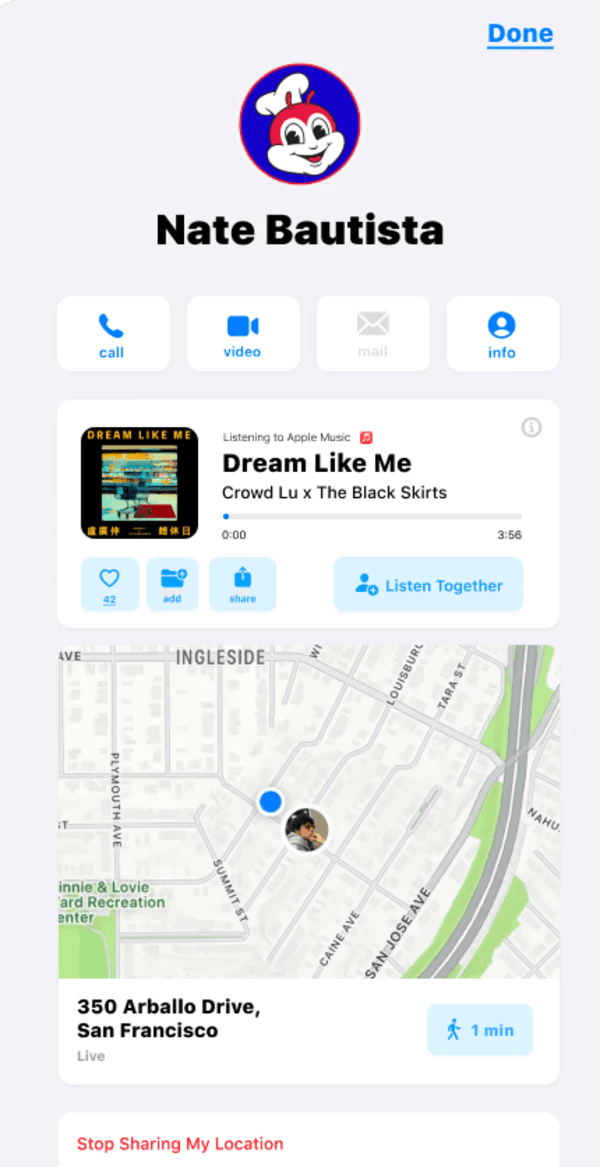
The final design follows a clean, minimal layout that feels built into the ecosystem. The Song Island lets users instantly see what their friends are listening to, join in with one tap, or start a conversation right from their contact profile. It feels effortless — like it's always been part of iOS.

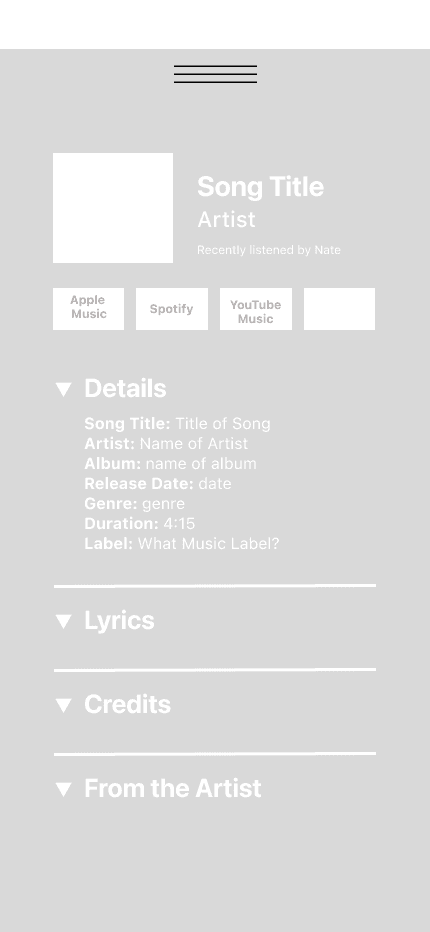
The first sketch
Song Card
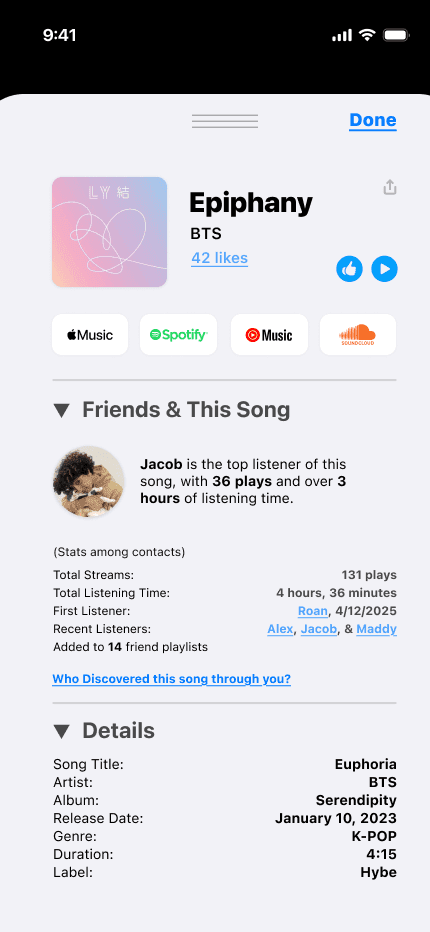
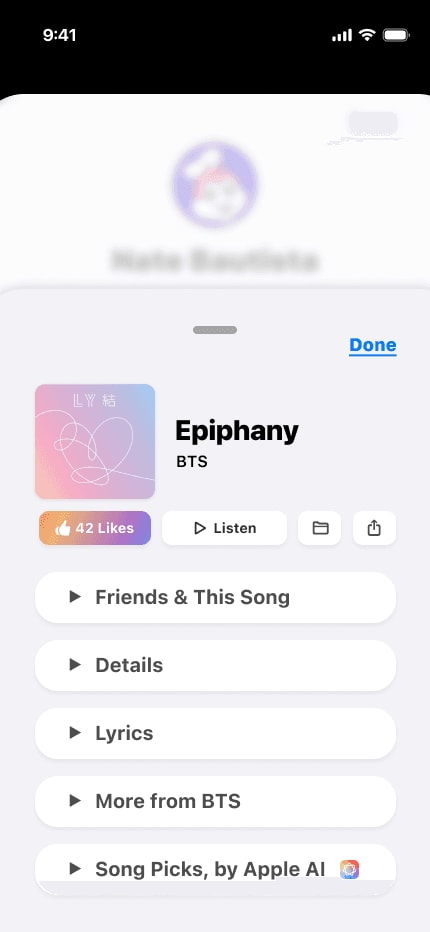
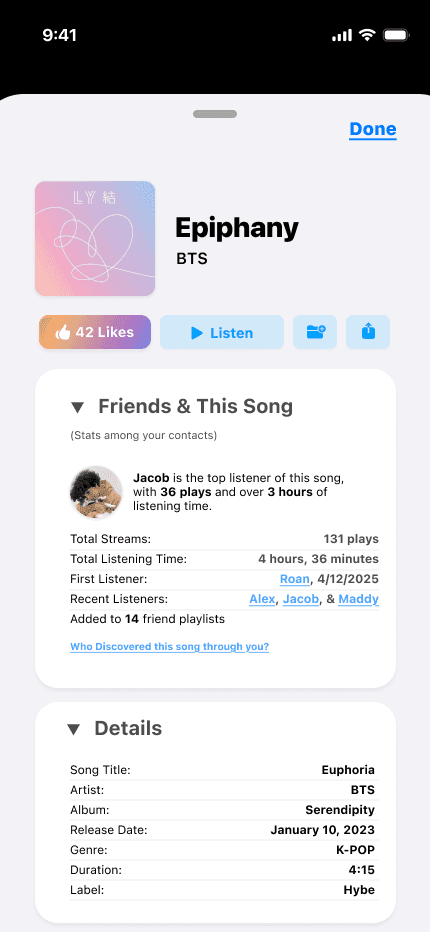
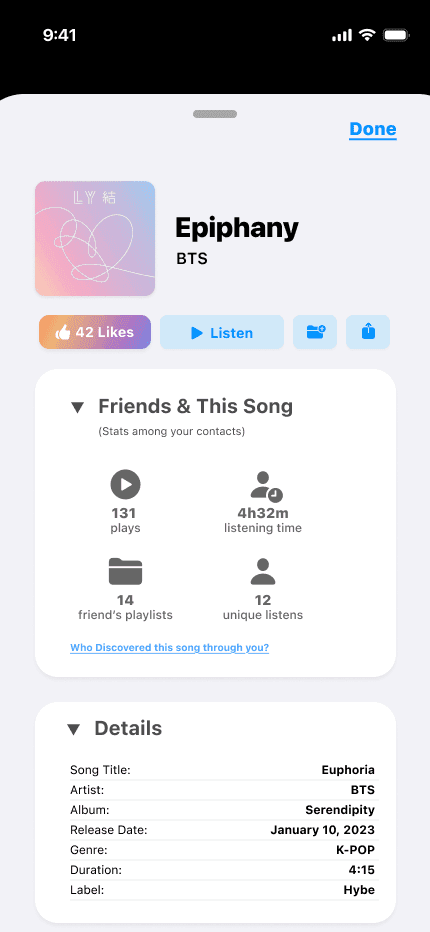
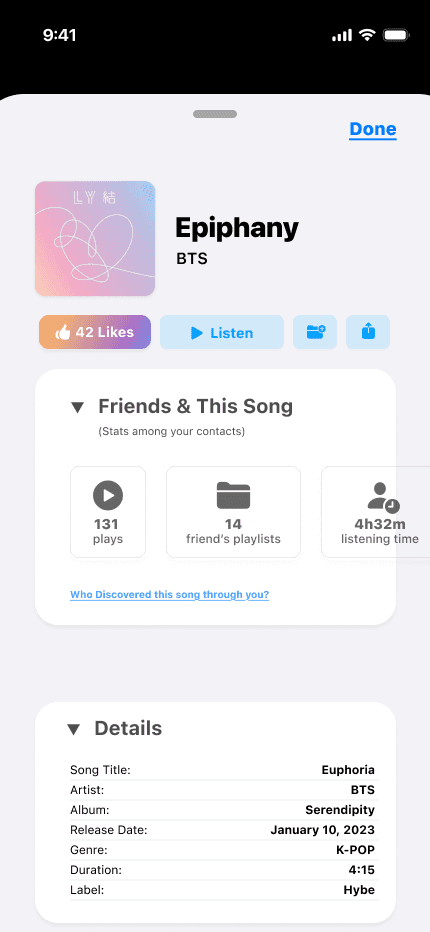
For the Song Card, the real challenge was turning a ton of song-related info into something that still felt simple and iOS-friendly. I wanted users to see everything they care about — lyrics, friend stats, recommendations, details, and quick actions — without feeling like they're digging through clutter. Finding that balance between depth and simplicity was the hardest part, especially when deciding which actions truly mattered and how each section should flow together.
Through multiple iterations, I refined the layout into a clear, layered card system that mirrors Apple's design patterns: essential actions up top, core details centered, and deeper content available through smooth, scrollable sections. This let me keep the experience simple while still offering depth. The final Song Card feels familiar, lightweight, and accessible anywhere in Sessions ~ giving users Shazam-level context without overwhelming them.
Here's a deeper dive into the key decisions behind Sessions Recap - shown step by step.
This breakdown highlights the key decisions behind the Sessions Recap, but it doesn't capture every step along the way. If you'd like to see the full Figma files or dig deeper into the process, tradeoffs, and iterations behind any of the deliverables, feel free to reach out—I'm always happy to walk through my thinking.
Introducing
Sessions
A new way to Listen, Share, and Experience music together.
01 · The Song Island
01 · The Song Island
See what your friends are playing in real time, right from their profile on their Song Island. View active music, join a session, and share the moment with a single tap.
02 · Quick Access
Open your Session from Control Center to see what's playing, add songs, chat, invite friends, and adjust settings — all with a single swipe.
03 · The Song Card
See everything you need about a song in one place — listening stats with friends, song details, lyrics, and AI-powered recommendations. Open it in your music app or add it to a playlist with a tap.
04 · Sessions Settings
All your music-sharing controls in one place. Connect your favorite music apps, choose who can see your activity, manage notifications, and customize how you listen. You can also revisit past sessions or clear your listening data whenever you need.
05 · Sessions Recap
Revisit the moments that made your session special. The Sessions Recap brings back your stats, songs, and chat history — and makes it easy to add tracks or invite friends to run it back. And with Weekly Recommendations, you'll discover new music inspired by your listening and the people closest to you.
06 · Dynamic Island Notifications
Stay connected to your session with real-time updates in the Dynamic Island. See who's listening, what's playing, what's coming next, and jump in or reply to invites without leaving what you're doing.
01
AI became a real part of my process during this project — not just to move faster, but to think clearer. It helped me explore more directions, break creative blocks, and catch details I might've missed. It never felt like a shortcut; it felt like another perspective in the room.
Using AI with intention strengthened my workflow and made me more confident in how I iterate and refine ideas.
02
Sessions brought me back to the heart of why I wanted to design in the first place: building things that make people feel something. Thinking about shared listening, connection, and how people use music in their everyday lives made the project feel meaningful.
It reminded me that the best design isn't just functional — it brings people closer together. That's the kind of work I want to keep creating.
03
Working across Dynamic Island, Control Center, notifications, settings, and the recap pushed me to see Sessions as an ecosystem, not just a collection of screens. Every piece had to connect seamlessly, which meant making intentional choices about what truly supported the experience and what would only add noise.
Designing this way helped me understand what it means to shape a product experience, not just UI, and made me more confident in thinking holistically.

01
I'd bring Sessions into the hands of real listeners. I'd run usability tests to understand how people move through shared sessions, what moments feel intuitive, and where the design might create friction. Hearing how people naturally listen together — and how that changes across contexts — would help refine the flows, prioritize features, and shape the product into something even more human.
02
One of the most exciting parts of Sessions is how it brings people together through music. If I had more time, I'd explore how personalization could make the experience even richer ~ from smarter AI recommendations to social insights that feel delightful without being overwhelming. There's so much potential in showing patterns between friends, highlighting shared discoveries, or uncovering unexpected musical overlaps.
03
If I had more time, I'd work more closely with engineers to understand what could realistically ship within the iOS ecosystem ~ especially around background audio handling, privacy constraints, and how Dynamic Island and Control Center behaviors are structured at the system level. Translating the concept into something buildable would help refine the flows even further and make sure Sessions feels not only delightful, but technically sound and ready for real-world implementation.

Thanks for taking the time to dive into this project. If you want to explore the designs further, I'm happy to share the full Figma file — just reach out.
If anything here sparked ideas or questions, feel free to connect with me on LinkedIn. I'd love to keep the conversation going and hear your thoughts.