Music Sessions
Designing a Shared Music
Experience for iOS
Personal Case Study
UX/UI Design
iOS Feauture Concept
Project
Music Sessions for IOS
Type of Project
Personal / Self Initiated
Role
Product Designer
Skills
Figma, User Research,
Wireframing, Prototyping
🎯 Project Overview
Problem Statement
Music brings people together, but listening is still a largely solo experience. Friends text song links, share playlists, or send screenshots - yet there’s no effortless way to listen together in real time. Existing solutions require too much coordination, break immersion, or feel disconnected from how people naturally use their phones.
Solution
Sessions is a lightweight iOS feature that lets friends listen to music together in real time - designed to feel ambient, social, and non-disruptive. By integrating shared listening directly into the system UI, Sessions removes friction and keeps people connected without pulling them out of what they’re already doing.
This Case Study is about a 10-minute read.
Short on time? Use the button below to jump straight to the final solution.
🔍 User Research
Is there even a problem that needs a solution?
Before designing, I validated whether real-time shared listening was a meaningful problem. Through user surveys and competitive analysis, I assessed demand, surfaced existing friction, and identified opportunities where shared listening could add genuine value.
User Survey
Understand how people share music today
Competitive Analysis
Spot gaps in existing solutions
User Research
Create personas and map the shared listening journey
User Surveys
I conducted an initial survey using Google Forms and received responses from 39 adults (ages 19–30), recruited through word of mouth and posts on Instagram and LinkedIn.
I want to understand:
user’s behavior with music
user’s painpoints in existing music-sharing features
what key features would best improve the user experience

Click for Survey Questions
Key Takeaways
1.
Everyone listens to music
Most users listen to music for hours every day ~ mainly on their phones, computers, and cars
2.
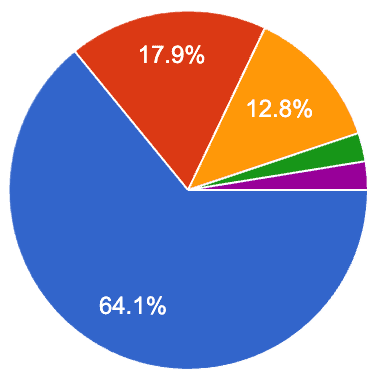
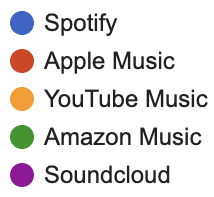
Spotify Reigns King
The survey made one thing clear: Spotify is where most people are listening. Apple Music and YouTube Music trailed behind, while the rest were scattered across niche apps and alternatives.
3.
Connection through Music
While not all survey participants felt a strong need for a real-time music-sharing feature, many saw its potential to improve how people connect through music.
Users can see its value in virtual settings, such as gaming sessions or long-distance relationships, as well as in group activities like workouts or study sessions. A feature like this would make shared listening more seamless and accessible for those who want to.
4.
Privacy Matters
Most people liked the idea of sharing their listening activity as a way to connect with others, but they still want control over when and with whom. Privacy came up a lot — users want the flexibility to choose which friends can see what they’re playing, and the option to go “incognito” whenever they’d rather keep their music to themselves.
5.
Current Options Fall Short
For most people I surveyed, Spotify Jam was the only real-time music feature they recognized — usually used at parties. A few had tried Discord bots or Apple SharePlay, but those came with constant complaints about lag and connection issues. Outside of that, many hadn’t explored any tools for listening together at all, highlighting just how limited and clunky the current options feel.
6.
Let's get to Work
TLDR; I've seen enough. I want to make this into a reality!
Survey Insights
Competitive Analysis
To better understand the landscape of real-time music sharing, I reviewed three existing solutions. My goal was to learn what these apps do well, where users get frustrated, and what opportunities exist to create a smoother, more engaging experience.



Spotify Jam
Strengths
Jam is built into Spotify’s massive ecosystem, which makes joining effortless. It shines in group settings where anyone can add to the queue and keep the vibe going.
Weaknesses
Outside of parties, the experience feels limited. The focus is on playlist control, not conversation. Hosting is also locked behind Premium, which creates barriers.
Opportunities
Shared listening could feel more personal. One-on-one sessions, quick sharing, and iOS-native touchpoints like Contacts or Dynamic Island could bring it into everyday life, not just events.
Threats
Because Jam lives inside Spotify, it can feel hidden or easy to forget. Without deeper integration into people’s daily routines, it risks becoming a limited feature.
Apple Shareplay
Strengths
SharePlay is deeply integrated into iOS, which makes it seamless to use. Starting a session is simple, and the playback sync is smooth across music, video, and more.
Weaknesses
It only works when you’re already on a FaceTime call, which makes it feel situational. The experience is tied to a video call, not casual, everyday listening.
Opportunities
SharePlay shows how music can connect people, but it’s tied to FaceTime. Bringing that experience into everyday iOS touchpoints could make sharing feel natural and spontaneous.
Threats
Because it lives inside FaceTime, SharePlay often goes unnoticed. Many users forget it’s there, and while seamless, it’s designed for passive co-watching — not for sparking conversations through music.
Discord Music Integration
Strengths
Discord brings a social layer to music in online spaces. Through the Spotify integration, friends can see what you’re playing in real time, and bots make group listening easy for communities already gaming or chatting together.
Weaknesses
The setup isn’t always seamless. Bots can break, quality isn’t consistent, and it all lives inside Discord — not a place people usually go just to listen to music. It feels tied to niche use cases rather than daily listening.
Opportunities
Discord shows that people love sharing what they’re listening to, but it’s stuck inside a chat app. Bringing that same social layer directly into iOS could make music sharing feel universal — not limited to gamers or specific communities.
Threats
Discord’s music features aren’t built for mobile. The Spotify integration feels clunky on phones and doesn’t let you listen along in real time. On top of that, reliance on third-party bots makes the experience unreliable and unstable.
SWOT Analysis
Looking at the SWOTs, it was clear each app had something going for it — but also big gaps. That got me thinking: what’s really missing from the experience, and how could I turn those takeaways into a problem worth solving? This is where I started pulling the insights together to define the real opportunity.
Understanding the People Behind the Problem
After identifying the gaps in existing music-sharing experiences, I wanted to understand who these problems really affect — and how they play out in their day-to-day interactions. The research pointed to a mix of listeners: those who use music to feel connected, and those who love discovering and sharing songs in the moment.
To capture their motivations and frustrations, I created two user personas that represent these behaviors, along with a user journey map to visualize where they run into friction when sharing music on mobile.
User Personas
Hello,
Jordan Kim
Age: 25
Occupation: Marketing Associate
"I love when my friends send me songs, but I wish we could easily listen to them together."
Listening Habits: Streams music all day while working and commuting. Shares playlists with friends but wishes it felt more interactive.
Frustrations
Sharing music feels slow and disconnected — links just sit in chats.
Apps like Discord or SharePlay require too many steps to sync up.
Misses the spontaneous moments of listening together.
Goals
Stay connected with friends through music
Discover what others are listening to in real time
Make listening together feel as easy as sending a text.
Main Motivator is Connection. Jordan sees music as a way to keep friendships alive and feel close, especially in long-distance or digital relationships. (This Persona is based on me hehe)

Hello,
Alex Rivera
Age: 22
Occupation: College Student
"When I find a good track, I want my friends to hear it now. Not later, not through a screenshot."
Listening Habits: Constantly exploring new artists and curating playlists. Loves showing friends what’s trending before it hits big.
Frustrations
Share music effortlessly without interrupting their flow.
Get quick reactions or conversations started around songs.
Feel seen for their music taste and discoveries.
Goals
Sharing on mobile feels clunky — links break, apps don’t sync.
Can’t see what friends are listening to unless they post it somewhere.
Most features feel built for parties, not everyday use.
Main Motivator is Expression. Alex uses music as identity — to express moods, personality, and connect with like-minded friends.
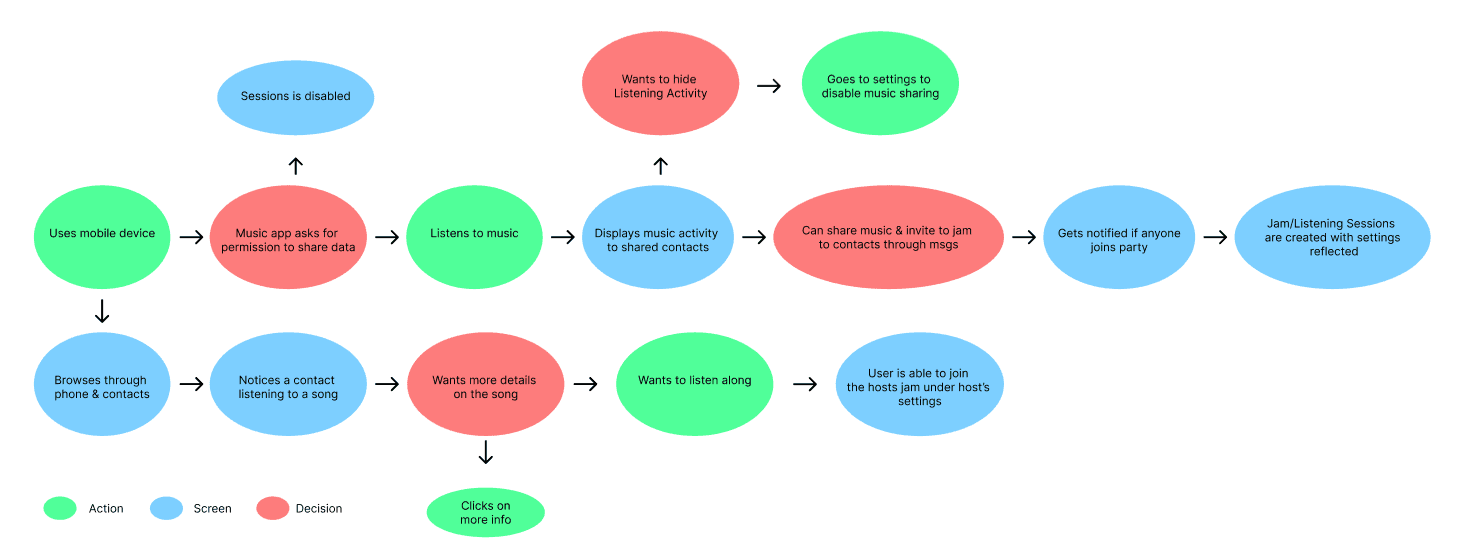
User Journey Map
This journey map explores how users discover, share, and join real-time music sessions with their contacts. The goal was to identify where excitement or friction occurs in the flow and uncover opportunities to make social listening feel more seamless, secure, and personal.
Persona & Journey Map Summary
Through my personas and journey mapping, I noticed clear patterns in how people share and connect through music. While motivations differed, most users wanted sharing to feel more natural and social. These insights revealed key opportunities that shaped my design direction and informed the “How Might We” statements in the next phase.
My Motivation
Music is a big part of my daily routine, but I’ve always felt it could be more social. Seeing how Discord’s Spotify feature lets friends listen together inspired me to create that same experience on our phones - turning casual listening into a shared moment that brings people closer.
💡 Insights
Sharing music on mobile still feels harder than it should.
Spotify Jam
fun for certain use cases, but not for everyday sharing
Shareplay
locked inside FaceTime calls
Discord + Spotify
no real-time listening on phones

Research Insights into How Might We Statements
Sharing music today feels clunky and requires multiple steps.
HCW make sharing music seamless on iOS without extra apps?
People want music to be social but not always public
HCW design for social connection while preserving privacy?
Music often sparks conversations, but current apps don’t support it.
HCW turn music into a conversation starter on mobile?
Insights into Design Direction
Insights only matter when they lead to thoughtful design. Using my research as a foundation, I began defining how the product should look, feel, and behave — focusing on connection, control, and simplicity.
Real-Time Music Sharing
Turning Listening into Shared Moments
The design focuses on making music sharing feel natural and spontaneous. Users can see what friends are currently listening to, jump into a live session, or send a quick “listen together” invite — all without switching apps or disrupting what they’re doing.
Privacy & Preferences
Control When and How you share
Users wanted ways to share that didn’t feel intrusive. In response, privacy settings give full control — from choosing who can view your activity to turning off sharing completely. These options let users decide what feels right for them at any moment.
Social Interaction
Making Music More Conversational
Instead of just sending links, users can react, reply, or comment directly on a song. These small, lightweight gestures transform passive listening into moments of connection — sparking new conversations around what people love.
iOS Integrations
Built Into the way you already listen
The experience lives within iOS — not as another app, but as an extension of what’s already there. From the Contacts app to Dynamic Island, users can see who’s listening and instantly tap to join. Everything feels native, familiar, and seamlessly connected to Apple Music.
Personalized Touchpoints
Designed Around Your Listening Habits
The system learns from how you share and who you connect with most. Favorite friends appear at the top of your list, shared sessions are easy to revisit, and suggestions evolve based on your listening patterns. Every detail is designed to feel personal — like the feature was made just for you.
List of Deliverables
The insights from my research shaped how visible shared listening should be and where it made the most sense within iOS. Instead of concentrating everything into one feature, I designed a set of lightweight touchpoints that fit naturally into existing behaviors and system surfaces.
Active Listening Display (On Contact Profiles)
Listening is already social, but invisible. Placing active listening on user profiles makes shared listening discoverable without forcing interaction, letting curiosity—not notifications—drive connection.
Sessions Quick Access (Control Center)
Shared listening needs to be fast and optional. Control Center access reduces friction by allowing users to join or manage sessions without leaving what they’re doing.
Song Card
When people share music, they often need context. The Song Card centralizes key details—track, artist, source, and session context—so users understand what they’re hearing without asking or guessing.
Settings
Shared listening introduces privacy and social pressure. Settings give users control over visibility, participation, and notifications, ensuring the experience remains opt-in and comfortable.
Sessions Recap
Shared experiences shouldn’t disappear the moment they end. Session Recaps turn real-time listening into a lightweight artifact—helping users revisit moments, discover music, and reflect on the experience.
Dynamic Island Notification
Shared listening should feel present, not distracting. Using Dynamic Island allows sessions to stay visible at a glance, keeping users informed without pulling them out of their current task.
📱 Prototyping
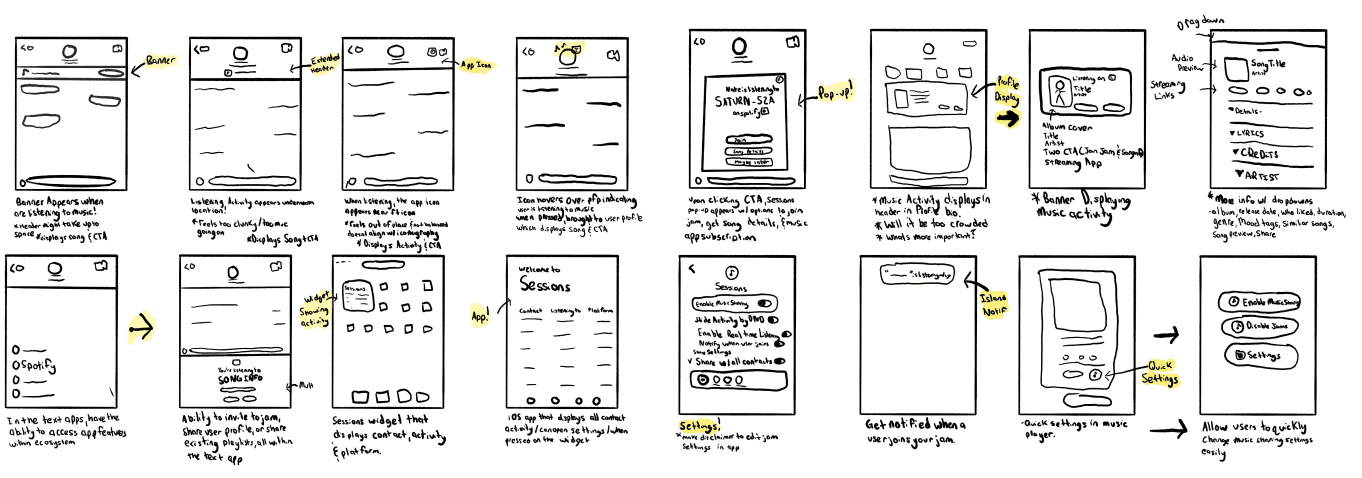
Early Sketches
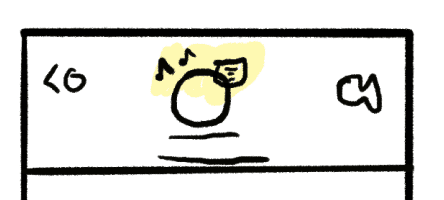
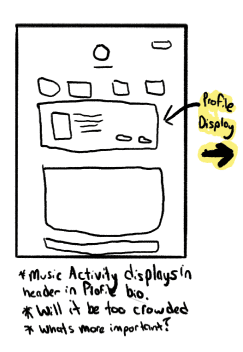
Early sketches turned research insights into real solutions. They helped me quickly map user pain points and experiment with ways the experience could address them before refining the design further.
Design Decisions
As I moved from sketches to screens, I focused on making each interaction feel simple and genuine. I played with different layouts and flows, refining what moments should feel spontaneous and what should feel more intentional.


Displaying Active Listening
Challenge
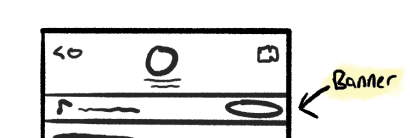
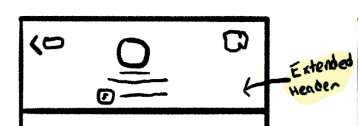
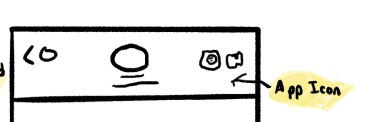
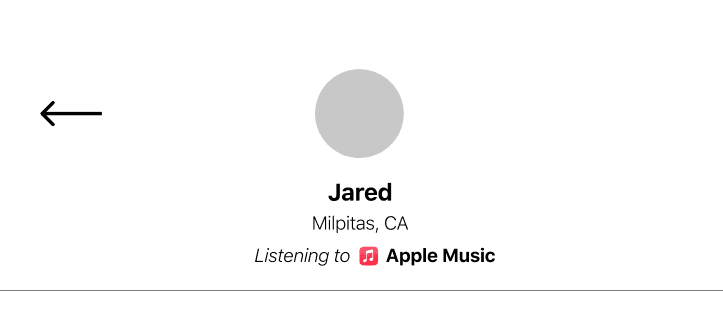
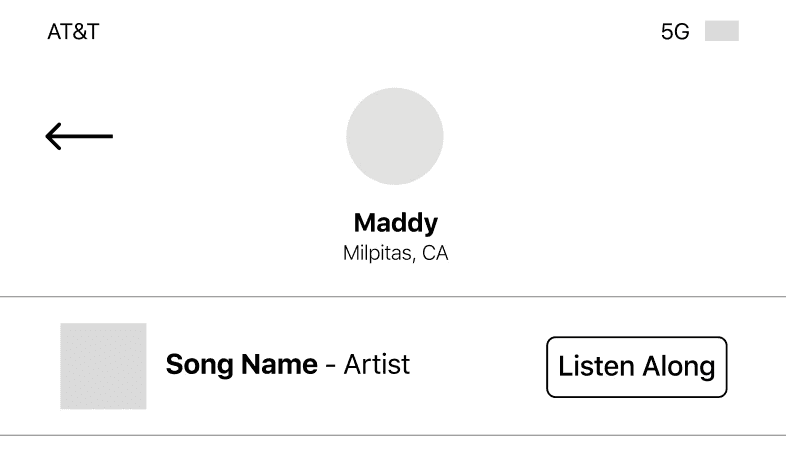
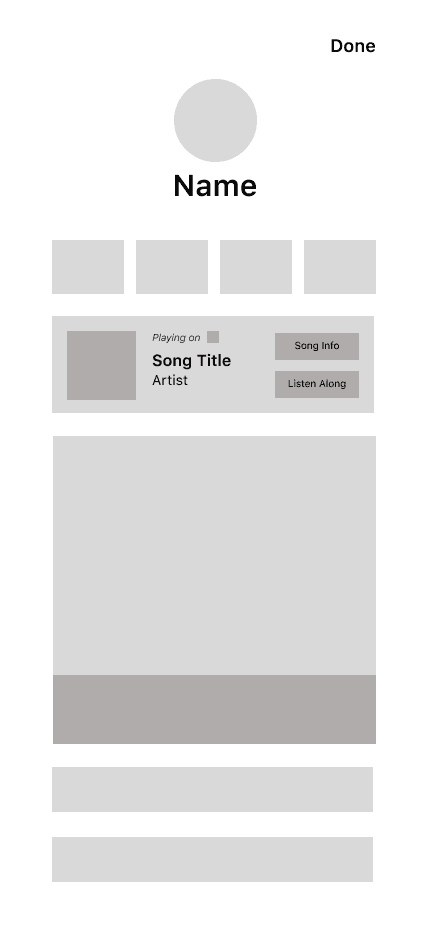
One of the first challenges was figuring out how to show that someone’s listening without disrupting the existing iOS layout. Early concepts took up too much space or felt out of place with native elements. I needed something subtle — something that fit naturally into Apple’s ecosystem.
Solution
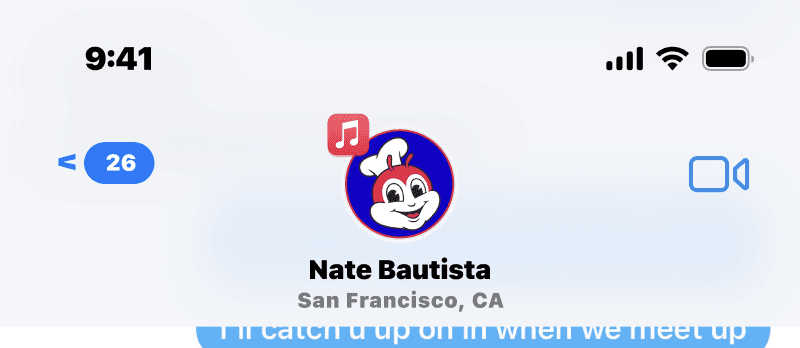
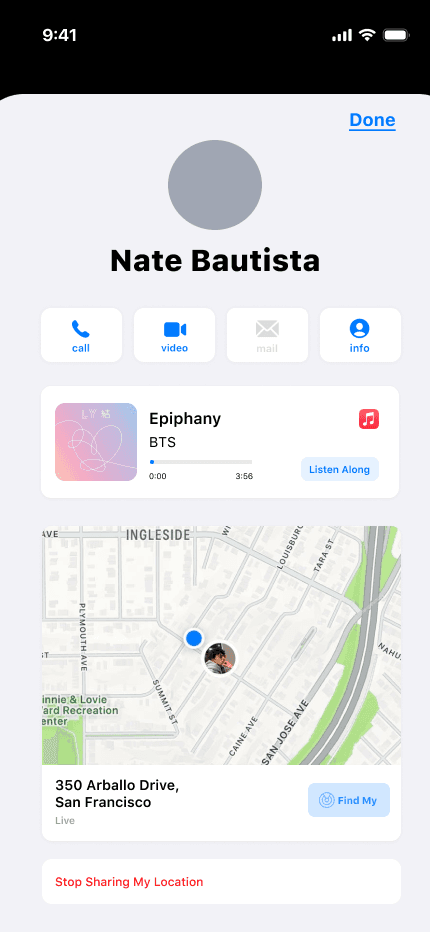
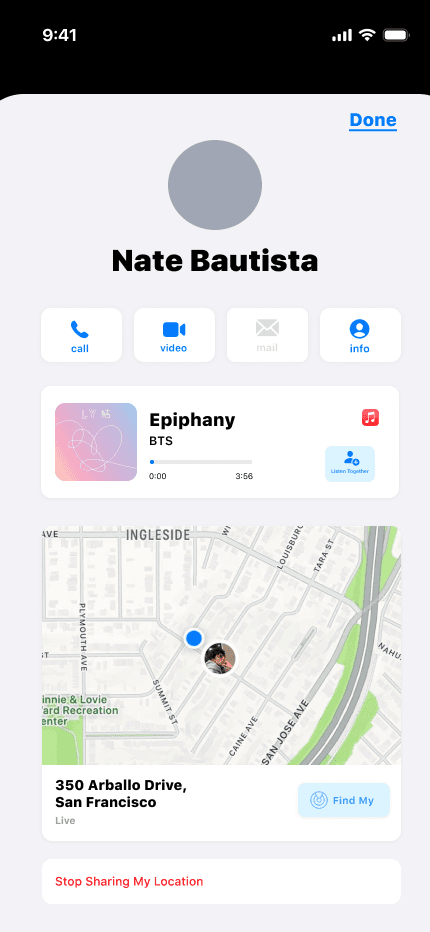
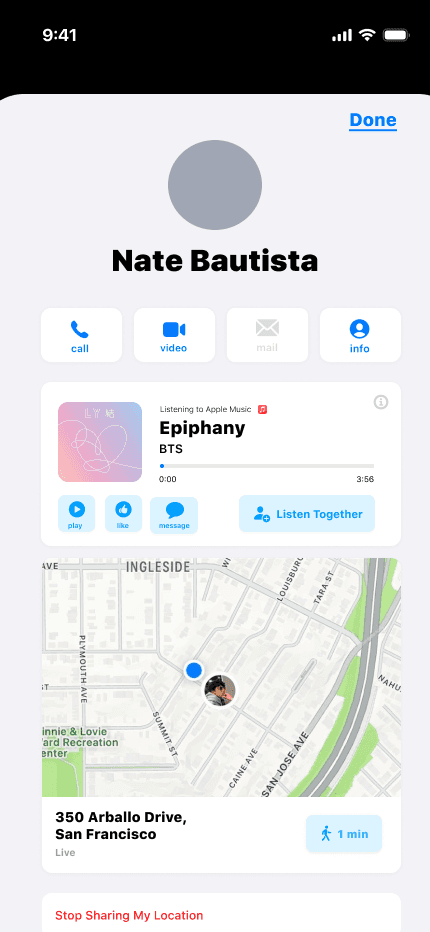
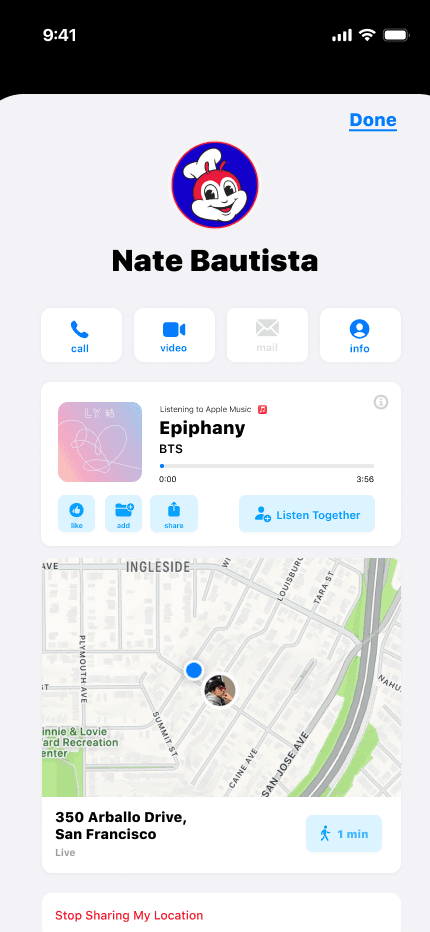
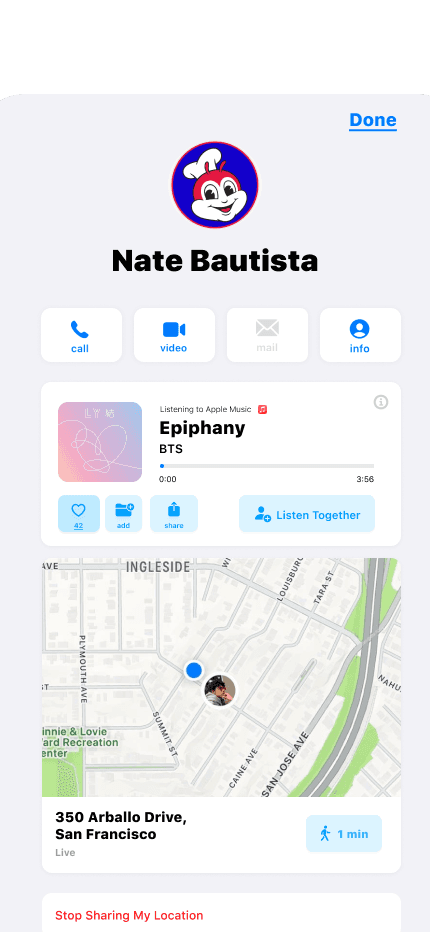
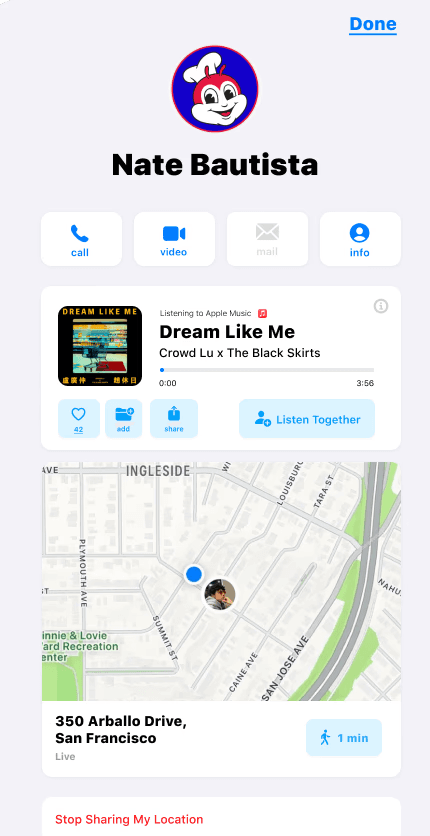
I landed on a simple solution: a small music-service icon placed above the user’s profile photo. It signals that they’re actively listening, while keeping the interface clean and familiar. Tapping the icon takes you straight to their profile, where you can see what they’re playing.
Solution
The final design follows a clean, minimal layout that feels built into the ecosystem. The Song Island lets users instantly see what their friends are listening to, join in with one tap, or start a conversation right from their contact profile. It feels effortless — like it’s always been part of iOS.
Solution
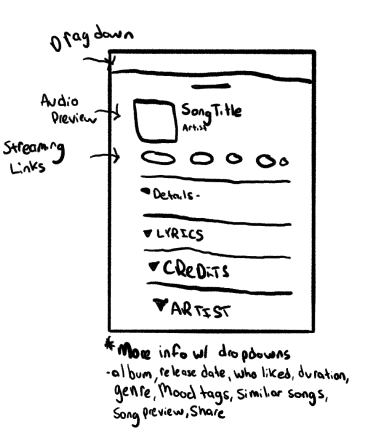
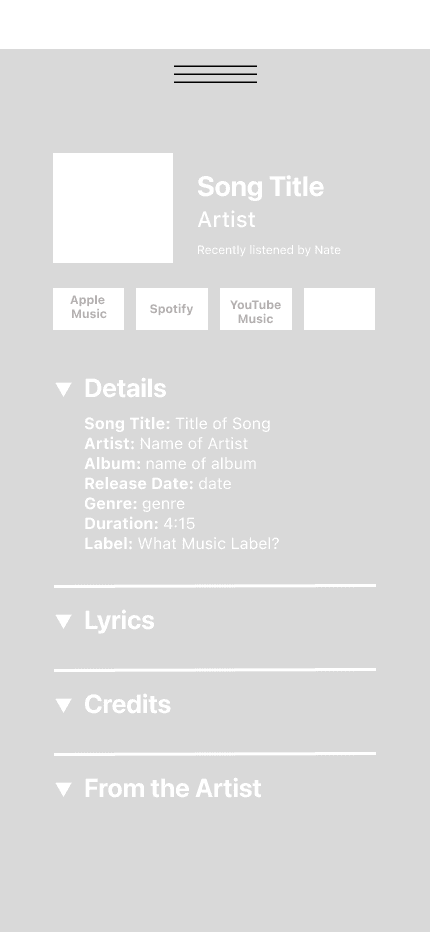
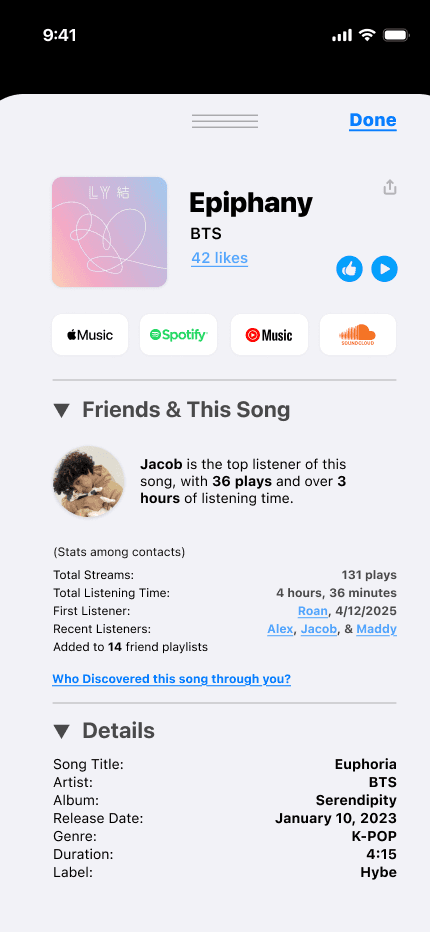
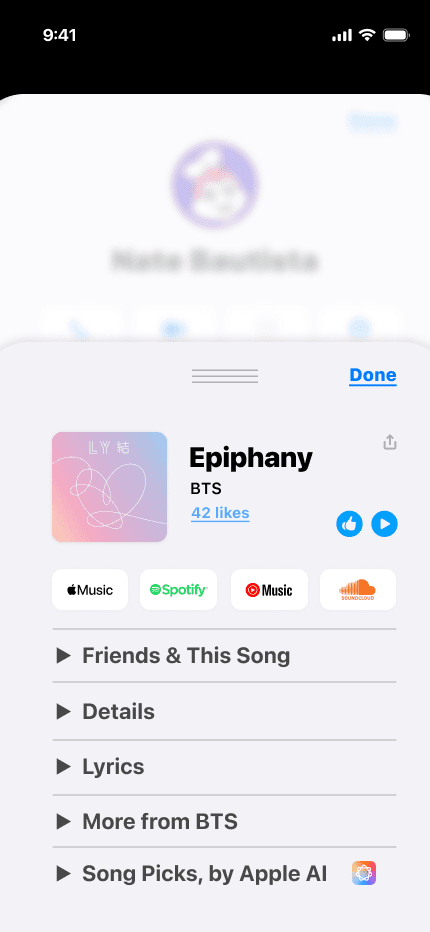
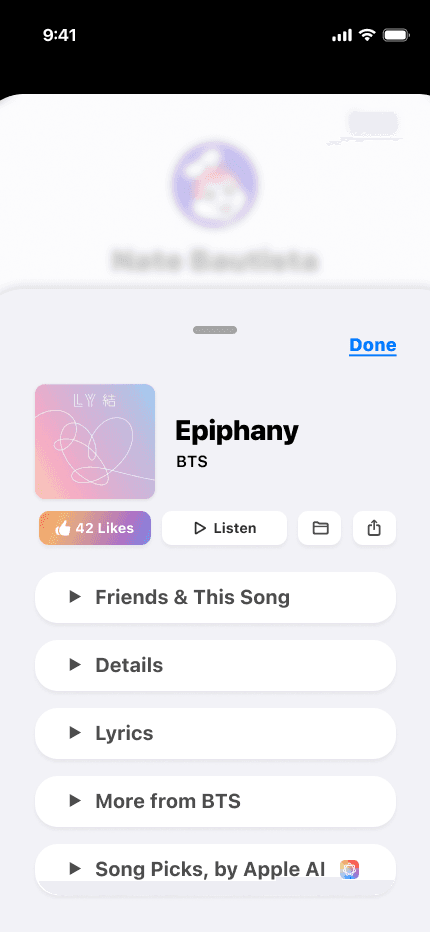
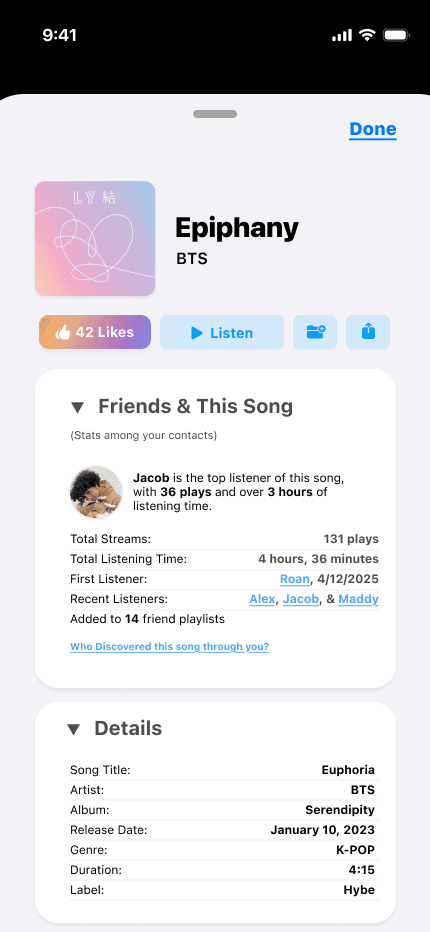
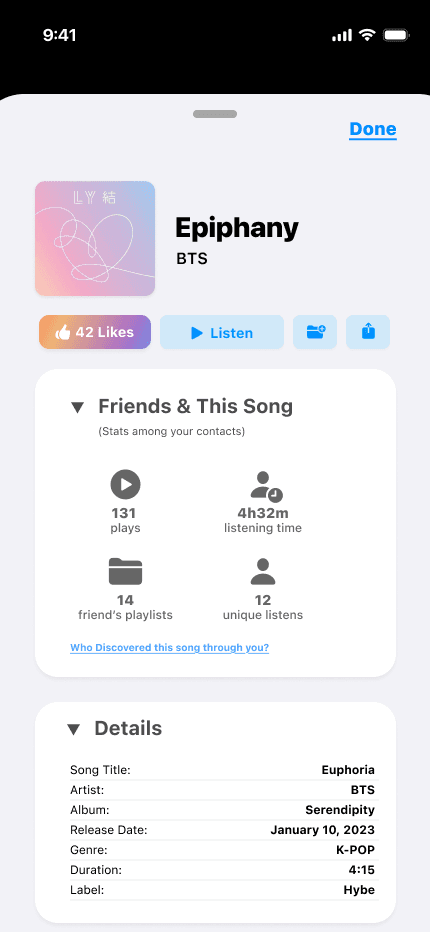
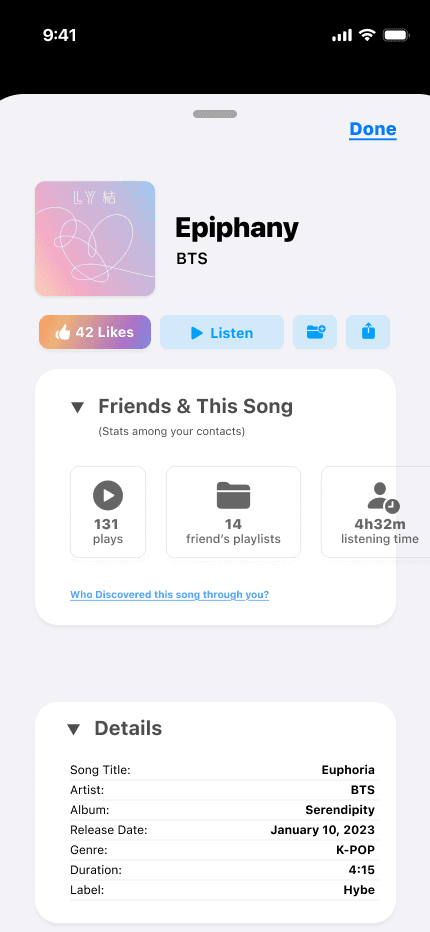
Through multiple iterations, I refined the layout into a clear, layered card system that mirrors Apple’s design patterns: essential actions up top, core details centered, and deeper content available through smooth, scrollable sections. This let me keep the experience simple while still offering depth. The final Song Card feels familiar, lightweight, and accessible anywhere in Sessions ~ giving users Shazam-level context without overwhelming them.
The Sessions Recap
Here’s a deeper dive into the key decisions behind Sessions Recap - shown step by step.
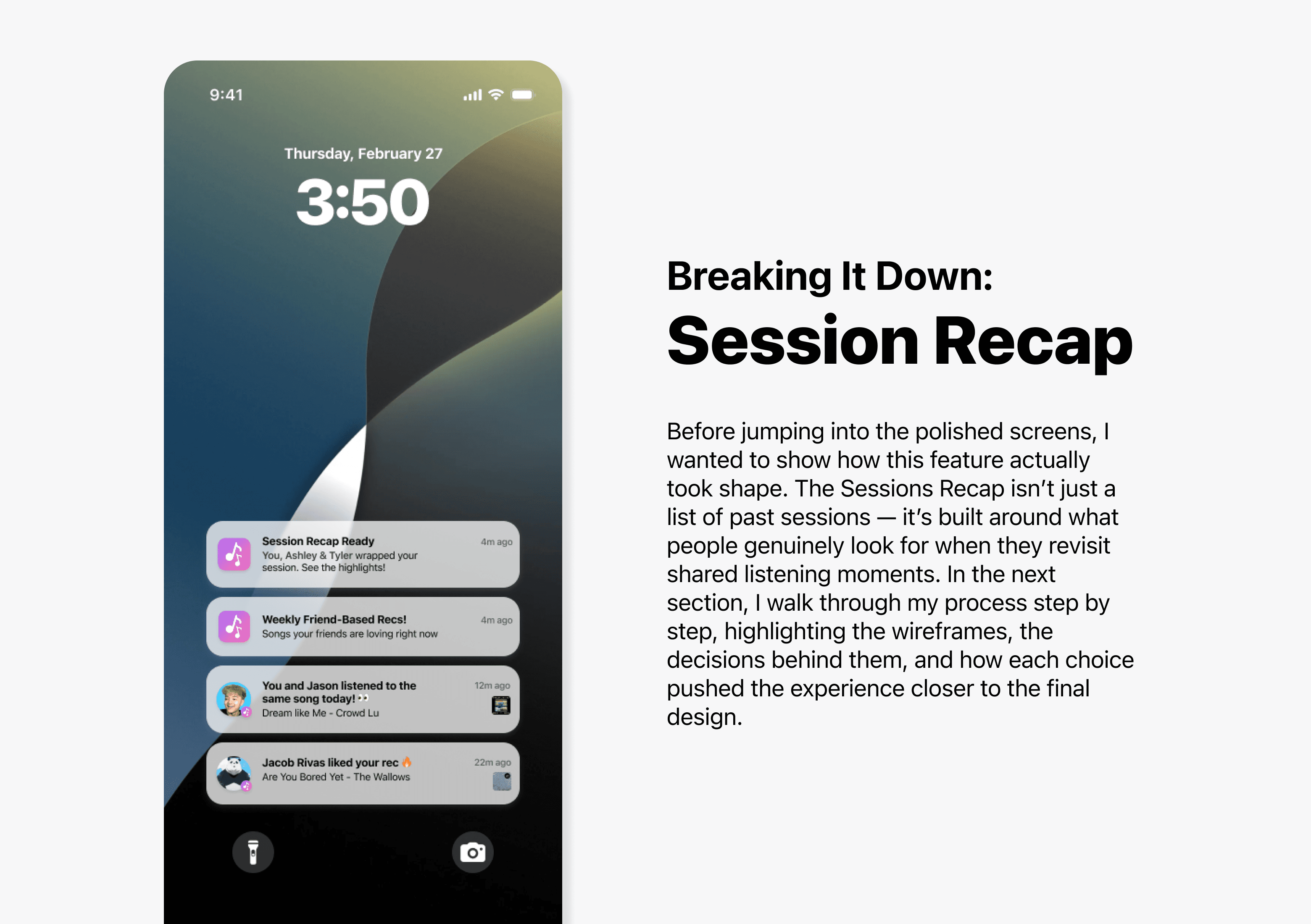
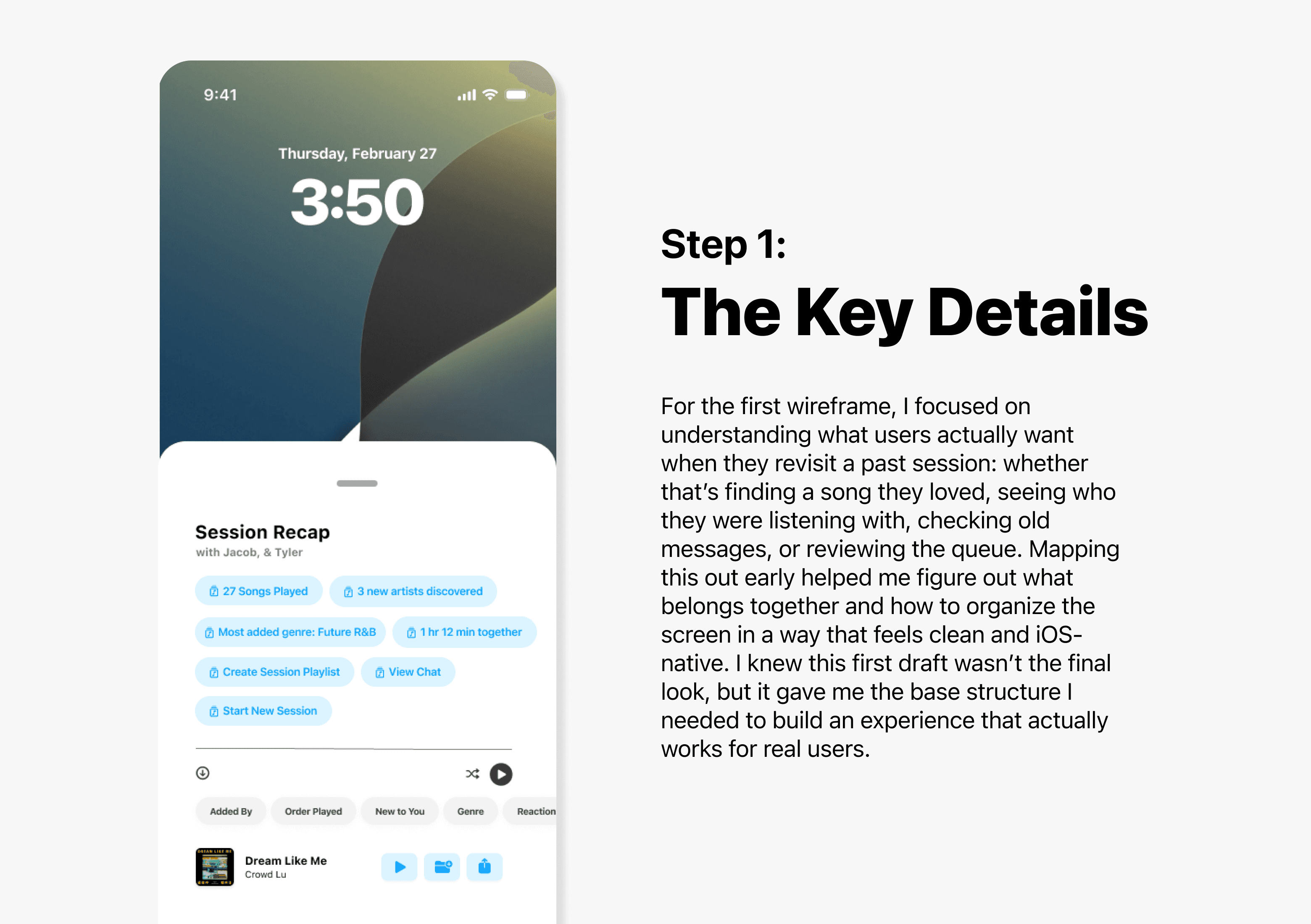
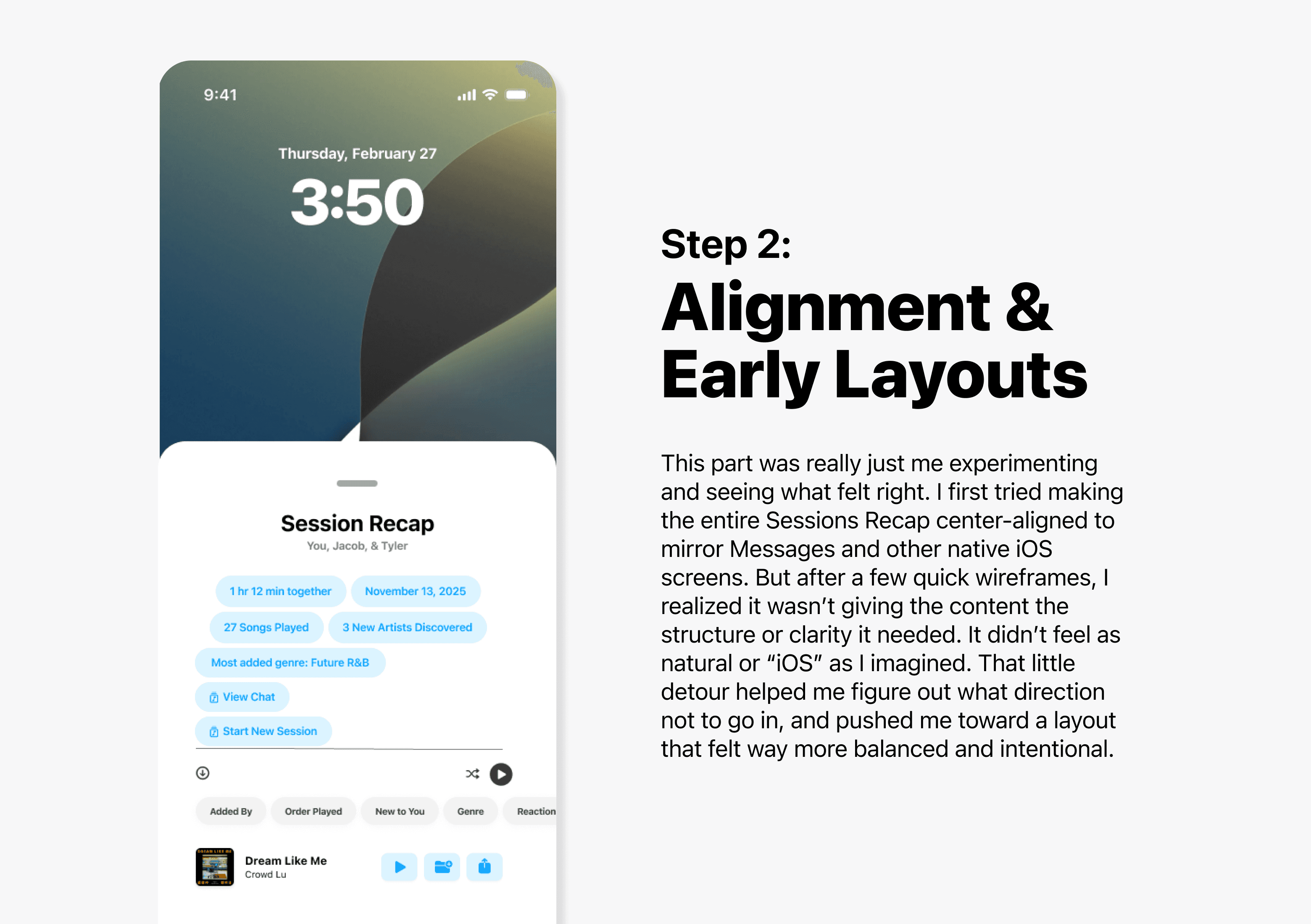
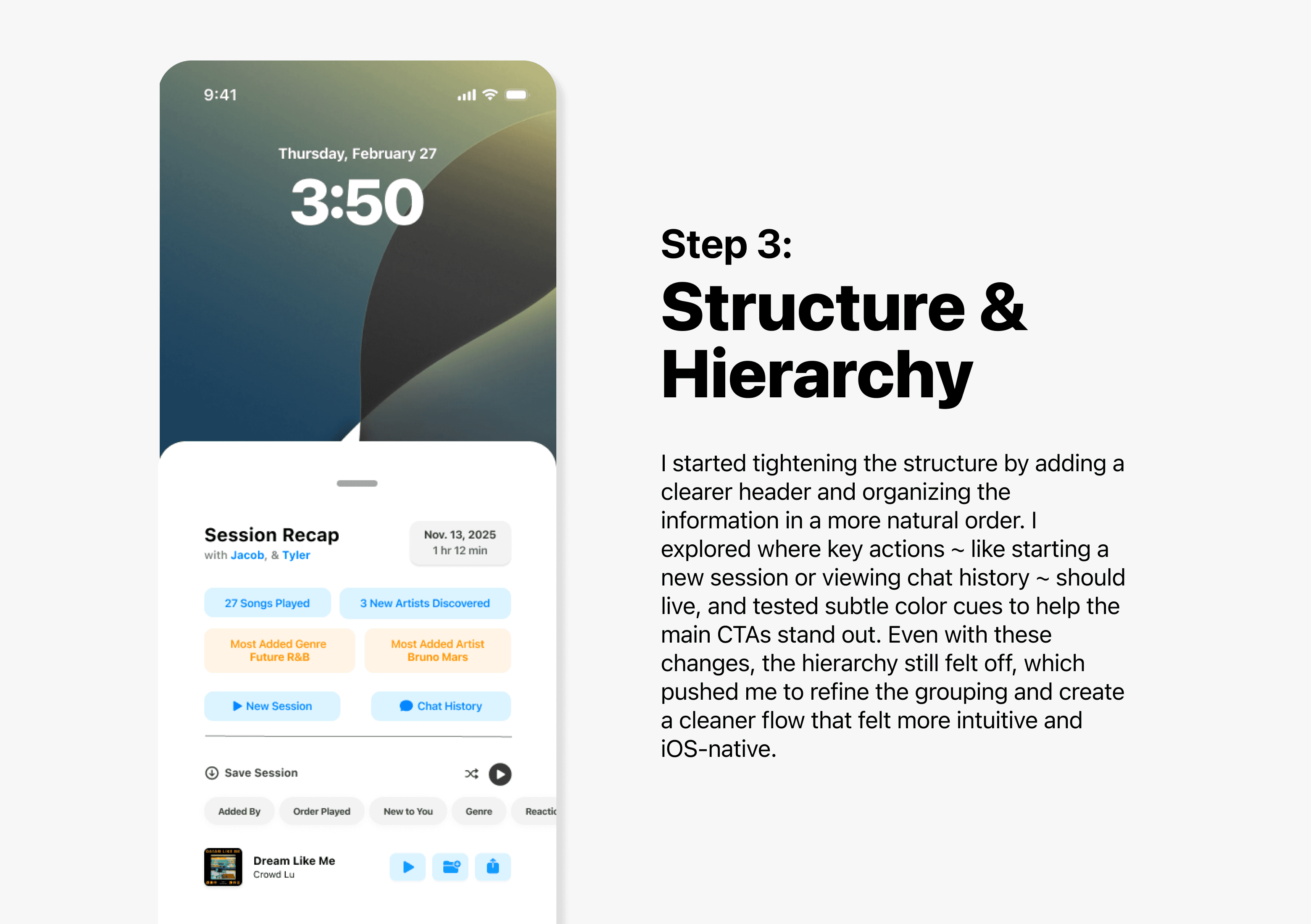
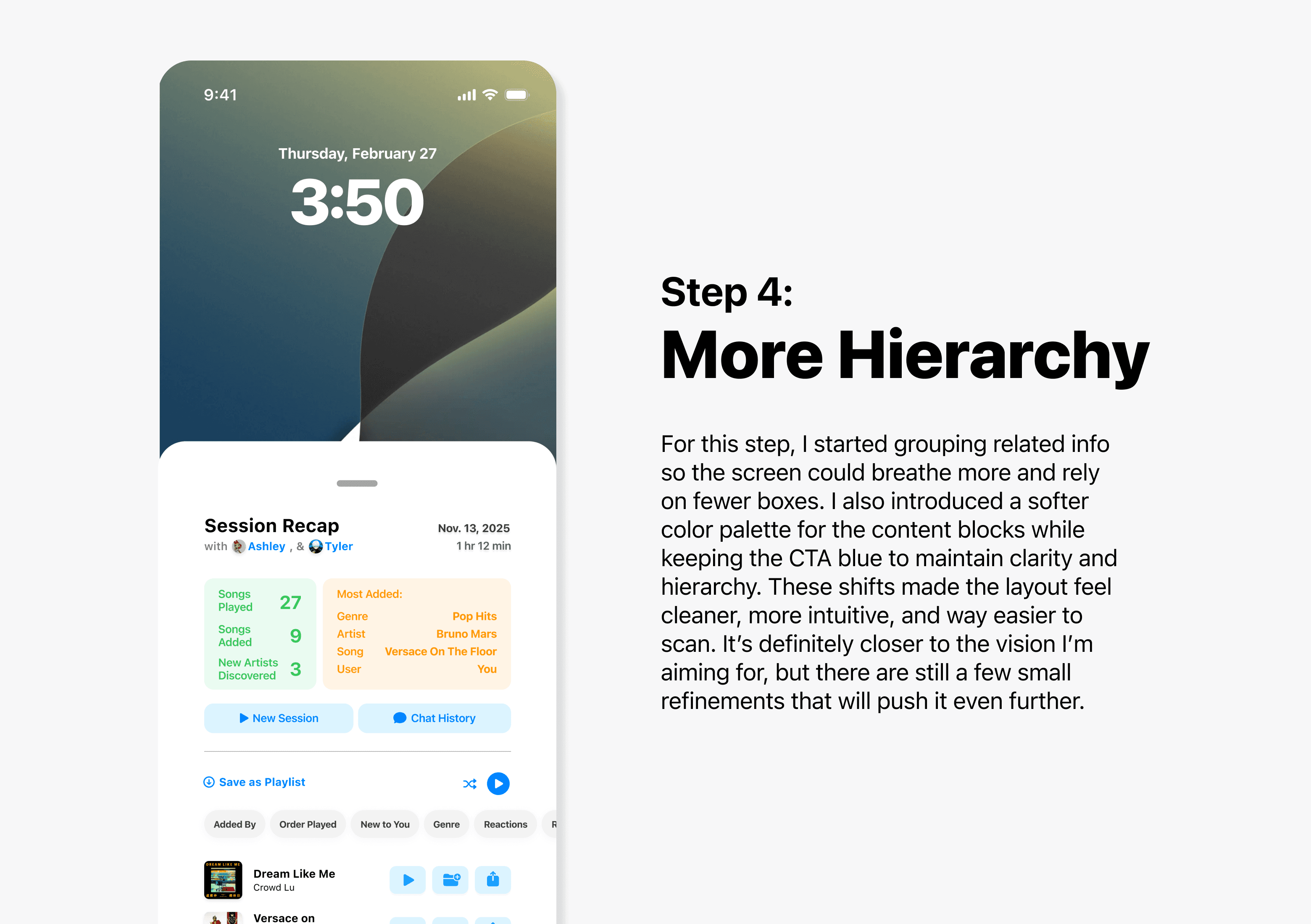
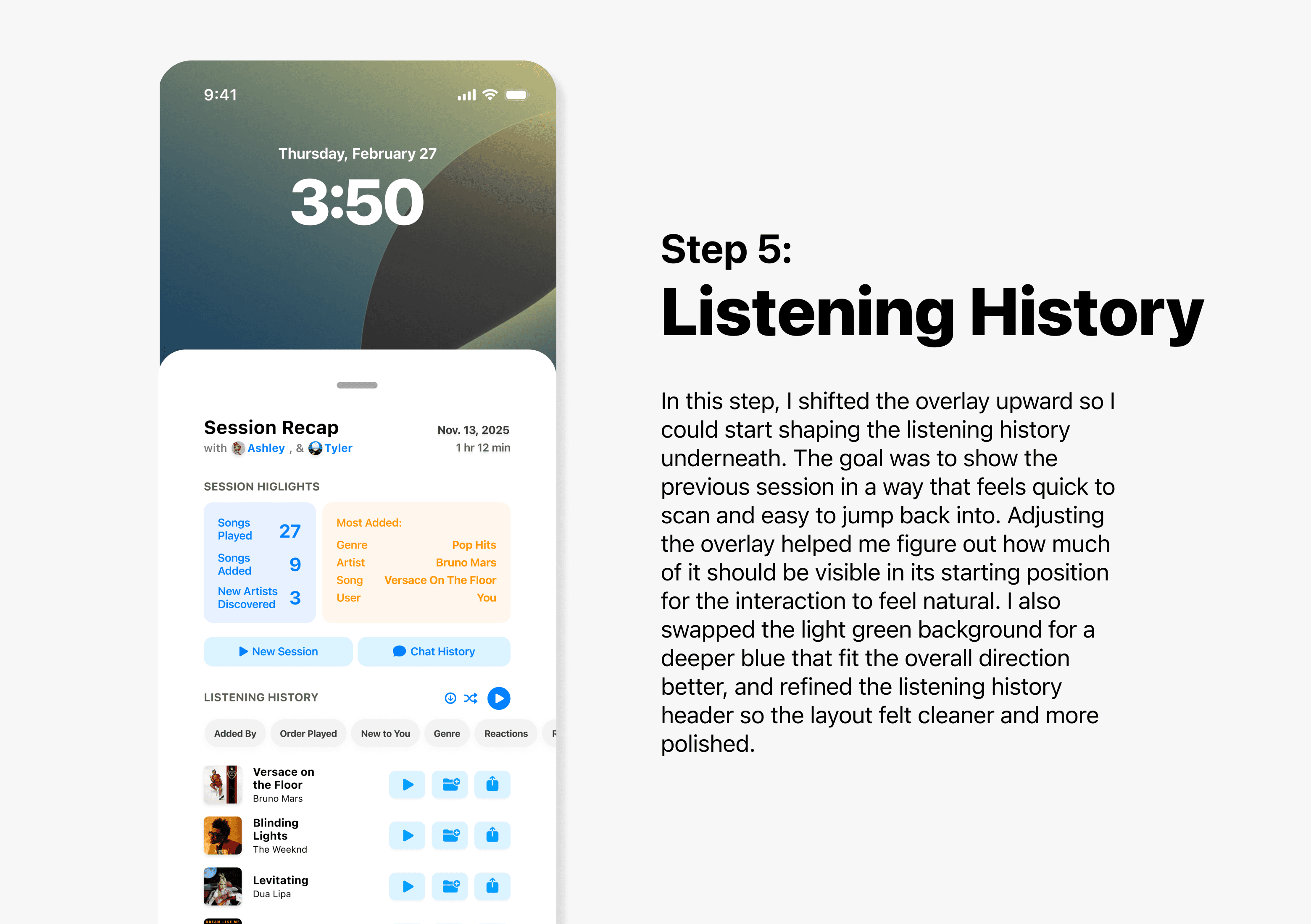
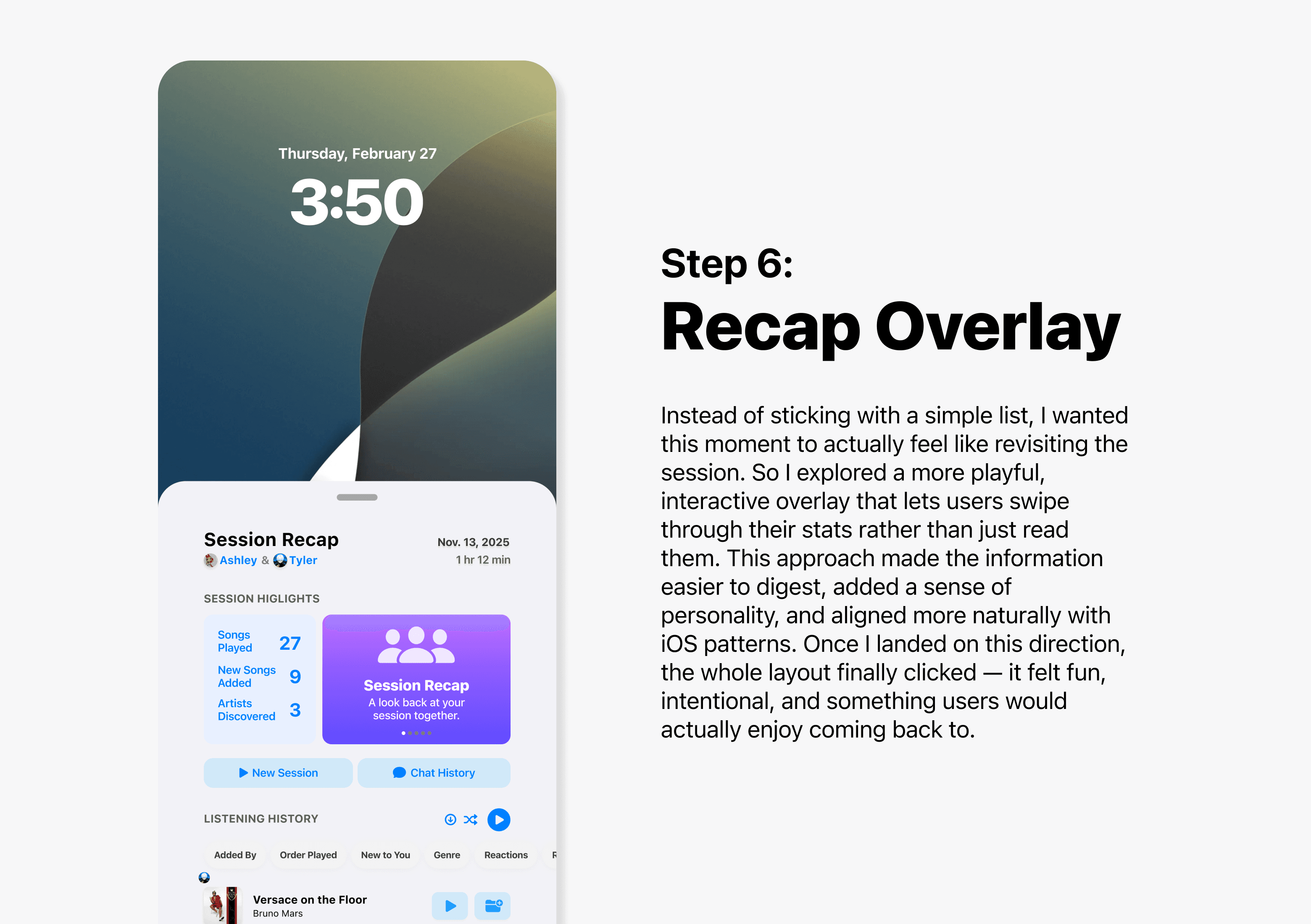
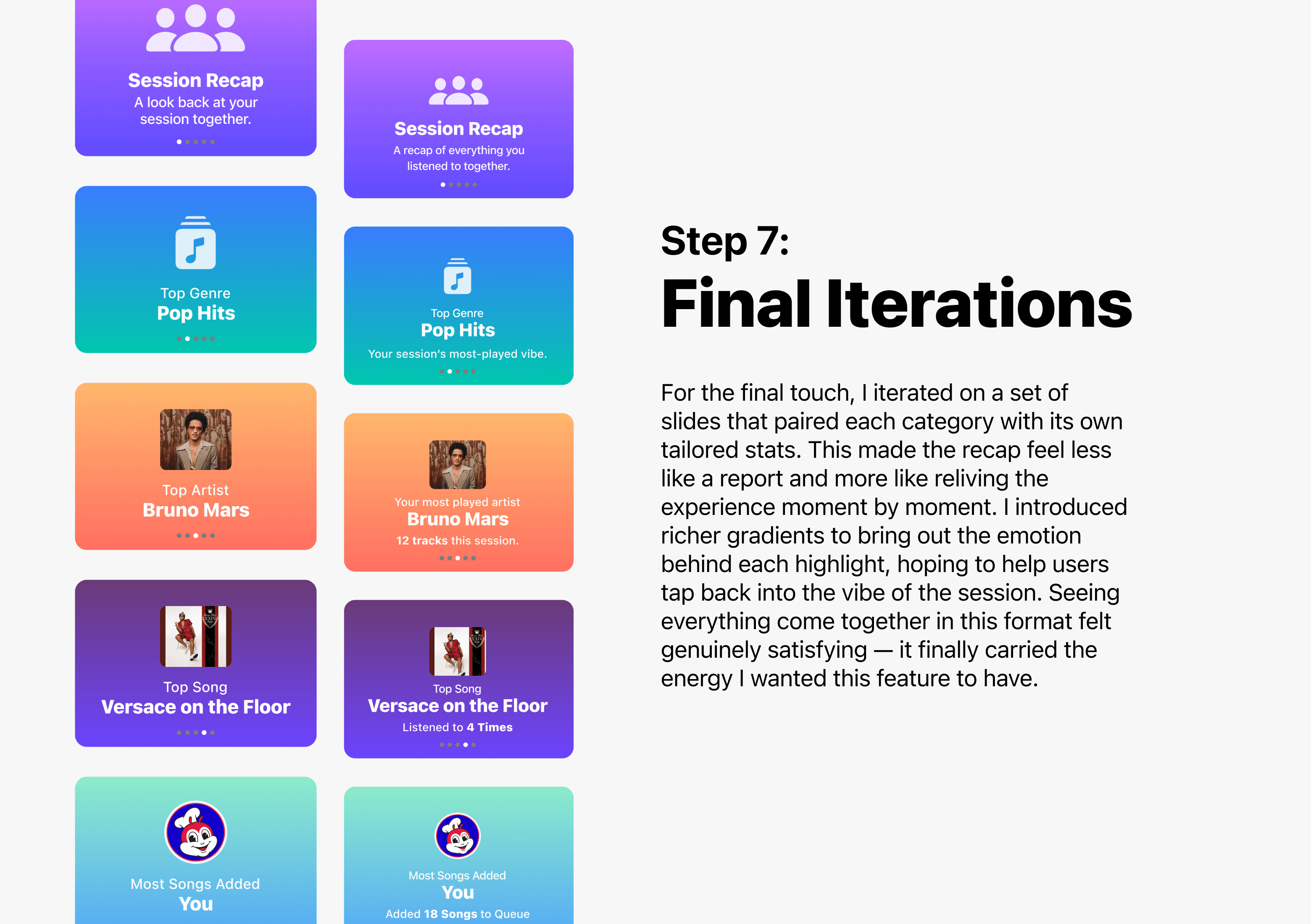
Design Decisions Breakdown
This breakdown highlights the key decisions behind the Sessions Recap, but it doesn’t capture every step along the way. If you’d like to see the full Figma files or dig deeper into the process, tradeoffs, and iterations behind any of the deliverables, feel free to reach out—I’m always happy to walk through my thinking.
Final Product
Use video playback to explore each interaction in more detail.
Introducing
Sessions
A new way to Listen, Share, and Experience
music together.
The Song Island
See What’s Playing, As It Happens.
See what your friends are playing in real time, right from their profile on their Song Island. View active music, join a session, and share the moment with a single tap.
Quick Access
Your Session, Just a Swipe Away.
Open your Session from Control Center to see what’s playing, add songs, chat, invite friends, and adjust settings — all with a single swipe.
The Song Card
Everything About a Song, All in One View.
See everything you need about a song in one place — listening stats with friends, song details, lyrics, and AI-powered recommendations. Open it in your music app or add it to a playlist with a tap.
Sessions Settings
Take Control of How You Listen.
All your music-sharing controls in one place. Connect your favorite music apps, choose who can see your activity, manage notifications, and customize how you listen. You can also revisit past sessions or clear your listening data whenever you need.
Sessions Recap
Relive Moments. Discover New Ones.
Revisit the moments that made your session special. The Sessions Recap brings back your stats, songs, and chat history — and makes it easy to add tracks or invite friends to run it back. And with Weekly Recommendations, you’ll discover new music inspired by your listening and the people closest to you.
Dynamic Island Notifcations
Stay Connected. At a Glance.
Stay connected to your session with real-time updates in the Dynamic Island. See who’s listening, what’s playing, what’s coming next, and jump in or reply to invites without leaving what you’re doing.
💭 Reflection

What I'm Proud of & What I've Learned
Growing My AI-Driven Design Process
AI became a real part of my process during this project — not just to move faster, but to think clearer. It helped me explore more directions, break creative blocks, and catch details I might’ve missed. It never felt like a shortcut; it felt like another perspective in the room.
Using AI with intention strengthened my workflow and made me more confident in how I iterate and refine ideas.
Reconnecting with People & Design
Sessions brought me back to the heart of why I wanted to design in the first place: building things that make people feel something. Thinking about shared listening, connection, and how people use music in their everyday lives made the project feel meaningful.
It reminded me that the best design isn’t just functional — it brings people closer together. That’s the kind of work I want to keep creating.
Designing With a Systems Mindset
Working across Dynamic Island, Control Center, notifications, settings, and the recap pushed me to see Sessions as an ecosystem, not just a collection of screens. Every piece had to connect seamlessly, which meant making intentional choices about what truly supported the experience and what would only add noise.
Designing this way helped me understand what it means to shape a product experience, not just UI, and made me more confident in thinking holistically.

If I Had More Time…
Validate the Experience With Real Users
I’d bring Sessions into the hands of real listeners. I’d run usability tests to understand how people move through shared sessions, what moments feel intuitive, and where the design might create friction. Hearing how people naturally listen together — and how that changes across contexts — would help refine the flows, prioritize features, and shape the product into something even more human.
Explore Personalization & Social Discovery More Deeply
One of the most exciting parts of Sessions is how it brings people together through music. If I had more time, I’d explore how personalization could make the experience even richer ~ from smarter AI recommendations to social insights that feel delightful without being overwhelming. There’s so much potential in showing patterns between friends, highlighting shared discoveries, or uncovering unexpected musical overlaps.
Making Sessions Work at Scale
If I had more time, I’d work more closely with engineers to understand what could realistically ship within the iOS ecosystem ~ especially around background audio handling, privacy constraints, and how Dynamic Island and Control Center behaviors are structured at the system level. Translating the concept into something buildable would help refine the flows even further and make sure Sessions feels not only delightful, but technically sound and ready for real-world implementation.

Closing Thoughts
Thanks for taking the time to dive into this project. If you want to explore the designs further, I’m happy to share the full Figma file — just reach out.
If anything here sparked ideas or questions, feel free to connect with me on LinkedIn. I’d love to keep the conversation going and hear your thoughts.